
NFPA 921's method, built into the case page.
Built by investigators, for investigators. Draw the scene instead of describing it, pick from the standard's own vocabularies instead of typing them, and let the record tell you what a complete, defensible investigation still needs.

A case record that is a text box and a file attachment cannot do this job.
Investigations Version 2.0 rebuilt the case page section by section against NFPA 921 (2024), NFPA 1033 and ASTM E620: over a dozen new tools, from scene sketching and a real photo log to ignition scenario elimination and a case readiness score. Every detail is recorded in the field, from property and exposure details to injuries, fatalities, interviews, evidence and involved parties, in the standard's own vocabulary. As departments replace the ATF's Bomb Arson Tracking System (BATS), this is the modern, integrated home for the whole case.
A text box cannot draw the scene or name a pattern
An RMS case is a narrative field and a file attachment: the sketch is on paper and the vocabulary is whatever the investigator typed.
Investigators draw the scene on the case, pick from NFPA 921's own vocabularies, and answer prompts instead of forty blank boxes. Every save shows its state and every failure says why.
A bolted-on module does not know what NFPA 921 asks
Nothing in a generic case record knows that ignition sources must be considered and eliminated with a basis, or what a defensible report still lacks.
Sources are eliminated with a basis, scenarios are tested against the 19.6.3 questions, the record suggests a cause determination under 19.6.5.1 and 19.7.4, and a readiness score says what the report still needs. The investigator confirms; the record never decides.
An attachment cannot compute, match or prove anything
A photo folder and a PDF cannot compute flashover, read capture data, or notice the same person on last year's case.
Flashover thresholds, neutral planes, flame heights and growth timing are computed from your own sketch. Capture data is read from every photo. People and vehicles are matched across cases, and license and VIN barcodes scan straight into the record.
Shown with sample data. Click the image to see the whole page.
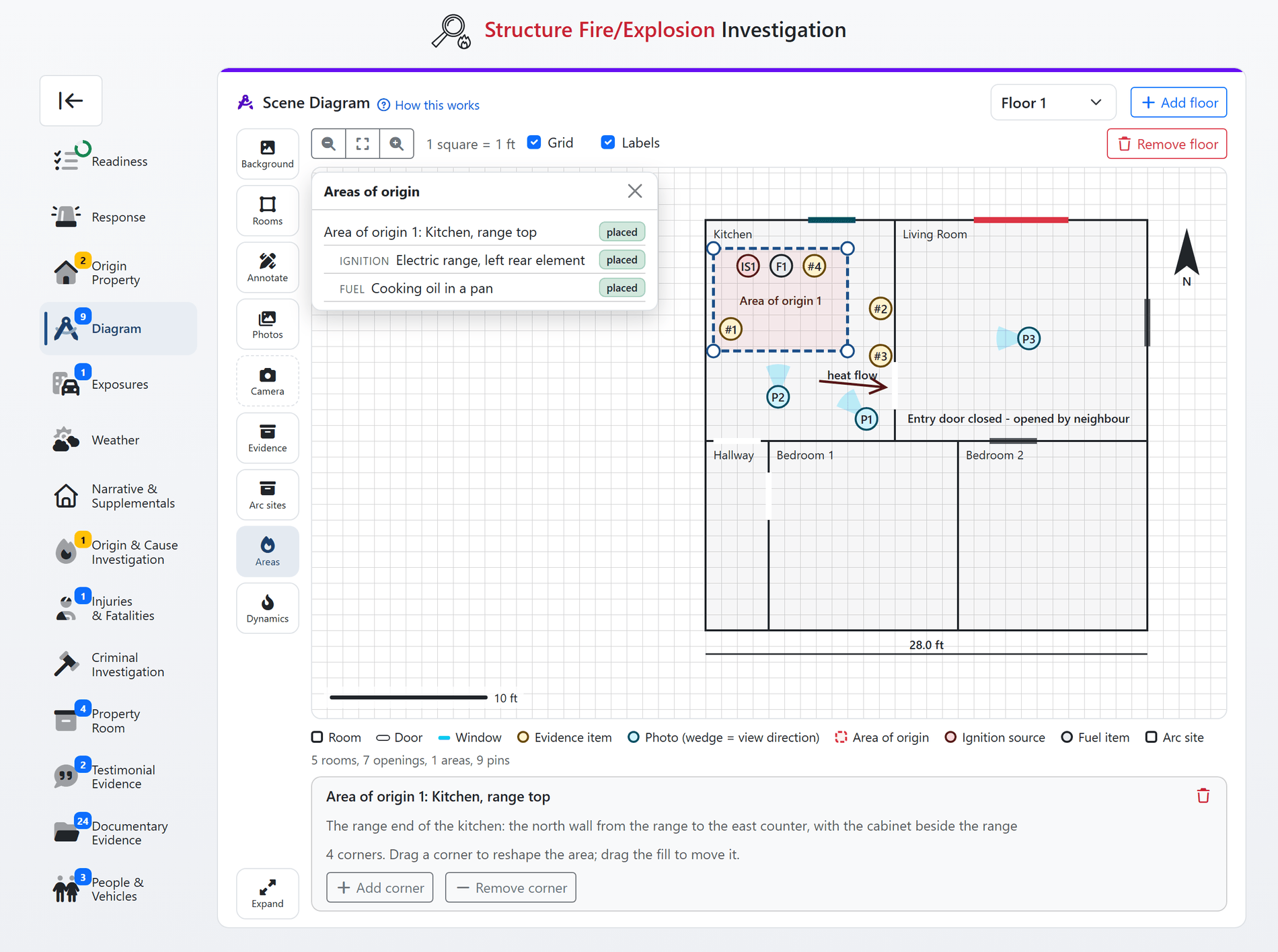
Draw the scene on the case.
The scene diagram is the center of Version 2.0. Rooms are placed from the record and sized in feet, doors and windows sit on the walls they belong to, and every pin points at something the case already holds: an ignition source, a fuel item, an evidence item, a photo. Nothing is drawn twice, and the finished figure drops into your report with a numbered key.
- Rooms, openings and areas of origin: room boxes with real dimensions, doors and windows on their walls with the state they were found in, and areas of origin drawn as shapes linked to the area records.
- Pins that point at the record: ignition sources, fuel items, evidence items, arc sites and photos are pinned, numbered and named from the case itself. Rename the item and the sketch follows.
- Floors, sketches and backdrops: a floor per story for a structure, a to-scale sketch for a wildland or vehicle scene, a site photo or heel map underneath, and a camera tool that shoots and pins in one step.
- Annotations, north and scale: dimensions, arrows, text notes and a north indicator, with a grid and scale bar that follow the zoom. Expand the canvas to the whole browser window when you need room to work.
- Straight into the report: the figure and its key are generated from the record for every Word and PDF report, never a screenshot.
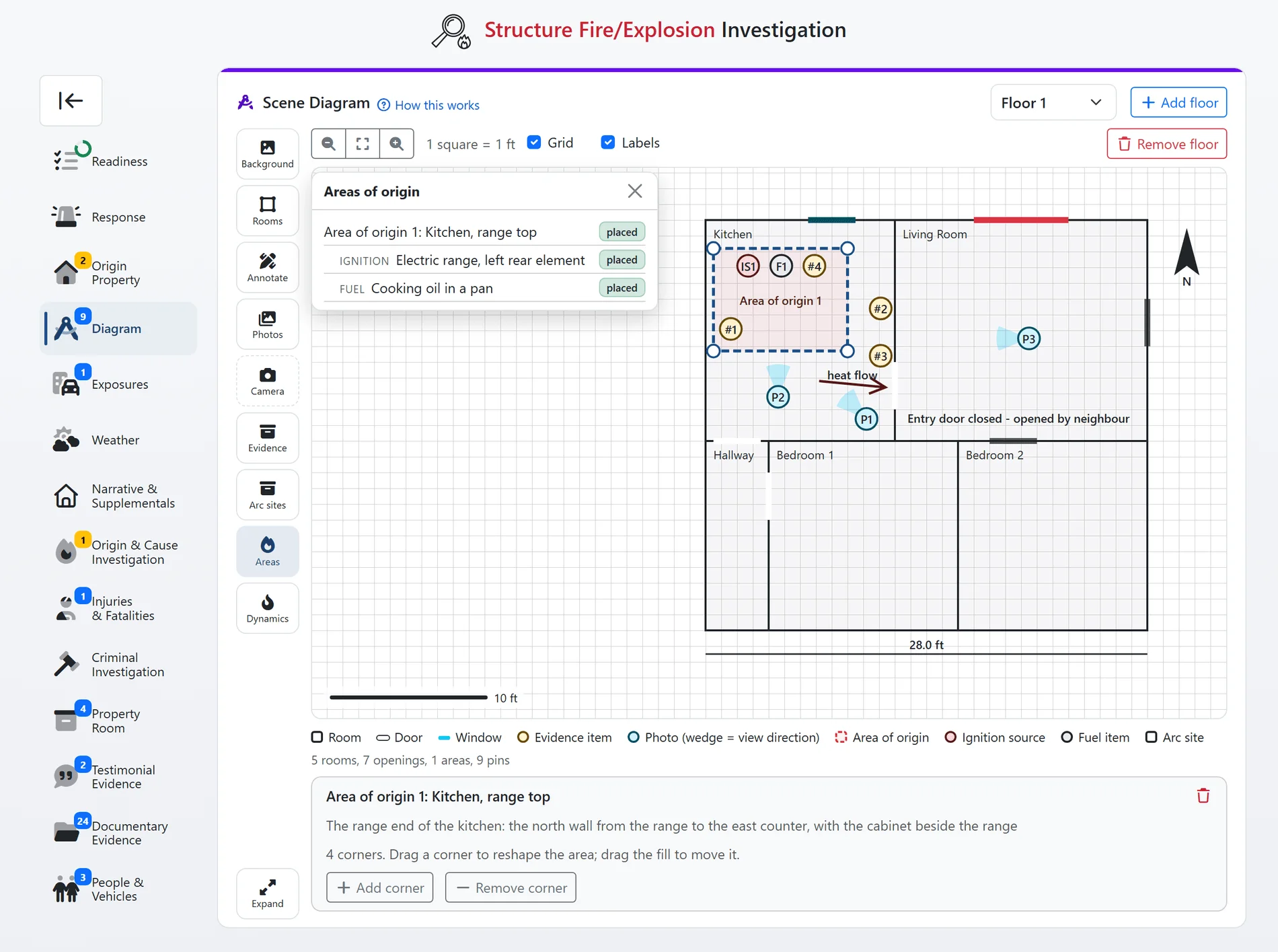
The Scene Sketch tab, shown with sample data. Every shape references a record on the case.
Shown with sample data. Click the image to see the whole page.
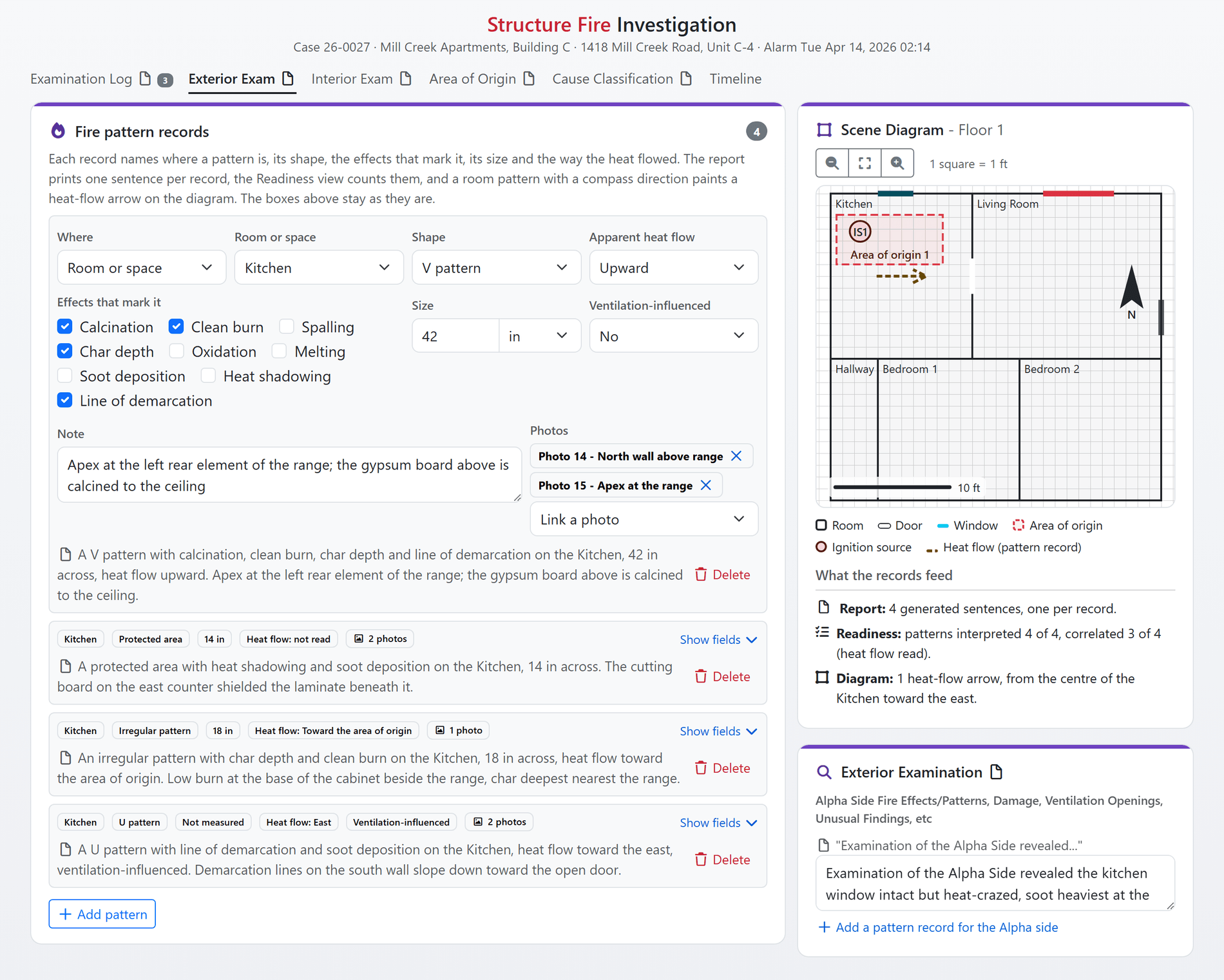
Fire patterns in NFPA 921's own words.
Pattern prose is still there for the narrative, but Version 2.0 adds a structured pattern record beside it: the shape, the indicators, the direction of heat flow, the surface, the side or compartment and the room, each picked from the standard's vocabulary. The sentence the report prints is generated from the record, and a room pattern with a compass direction paints its heat-flow arrow on the sketch.
- A vocabulary, not a blank box: V, inverted V, U, hourglass, truncated cone, saucer, trailer, protected area, arrow and irregular patterns, marked by calcination, clean burn, spalling, char depth, oxidation, melting, soot deposition, heat shadowing or a line of demarcation.
- Generated sentences: every record prints as one clear sentence in the report: "A V pattern with calcination, clean burn, char depth and line of demarcation on the Kitchen, 42 in across, heat flow upward." The same way on every case.
- Correlated on the sketch: directional patterns paint an arrow in their room, so the heat-flow story is visible next to the origin the scenarios propose.
- Readiness and review follow: patterns interpreted and correlated are readiness steps, and the review's own questions are hinted from them.
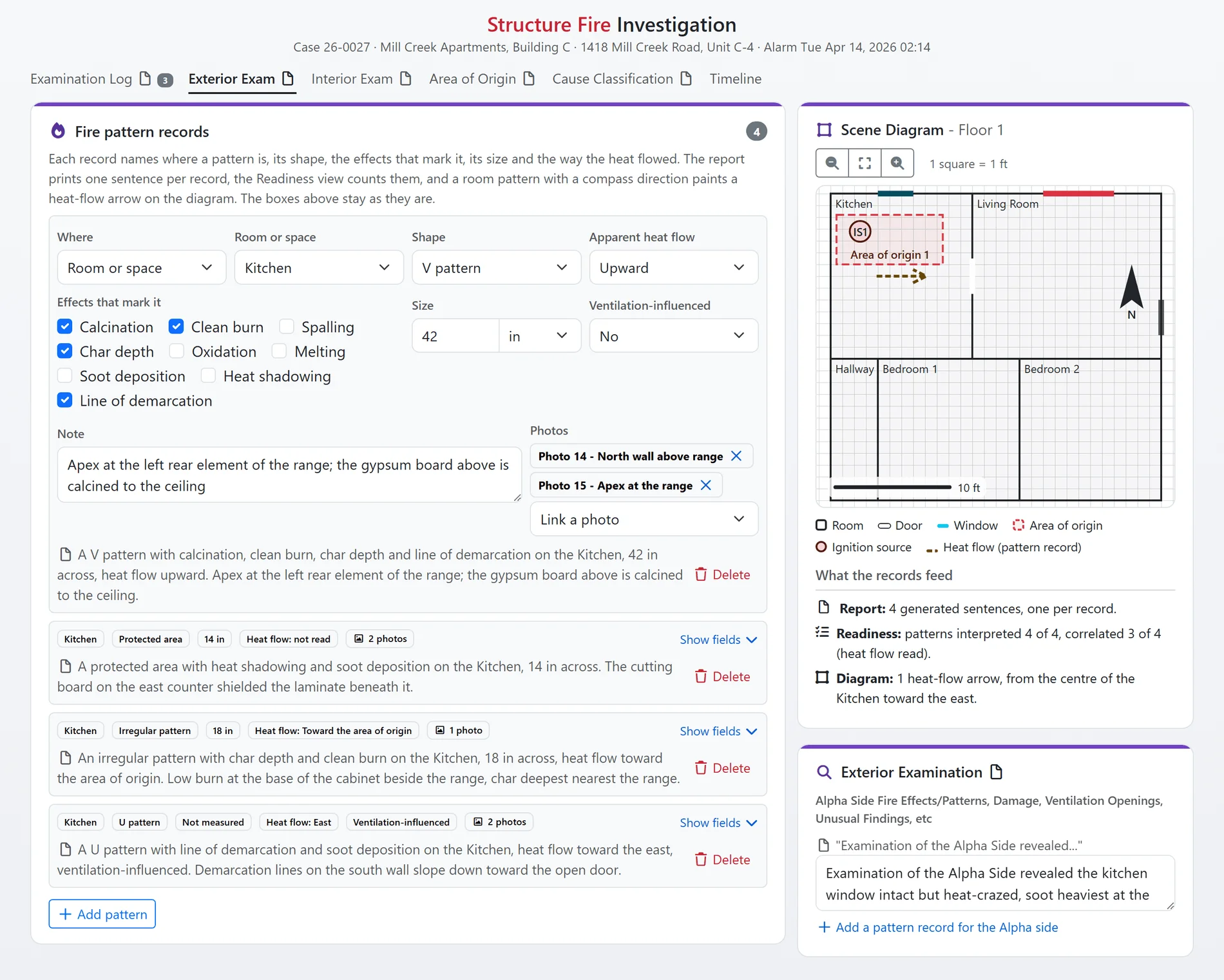
Structured fire-pattern records, shown with sample data.

Shown with sample data. Click the image to see the whole page.
Analytics that work the case with you.
Every case your investigators close is data your department is already sitting on. The analytics page reads all of it and tells you what changed, in plain language, on one screen. It flags incendiary fires clustering in one area, tracks cause and loss trends, measures how long cases take to close and how many end in an arrest, and turns the whole picture into a board-ready PDF in one click.
- Automatic insights: arson pattern alerts when incendiary fires cluster within two miles, loss concentration, shifting close times, and rising undetermined causes, written out for you, not left for you to spot.
- Trends and patterns: monthly case counts, cause classification mix, estimated loss, ignition-time heatmap, and areas of origin, each one comparable against the prior period.
- Operations: case pipeline, investigator workload, arson clearance rate, and days-to-close medians, plus a cause-colored map of the period's cases.
- One-click board report: a council-ready PDF built from the same numbers on the screen, with print and per-card image export for slides and grant applications.
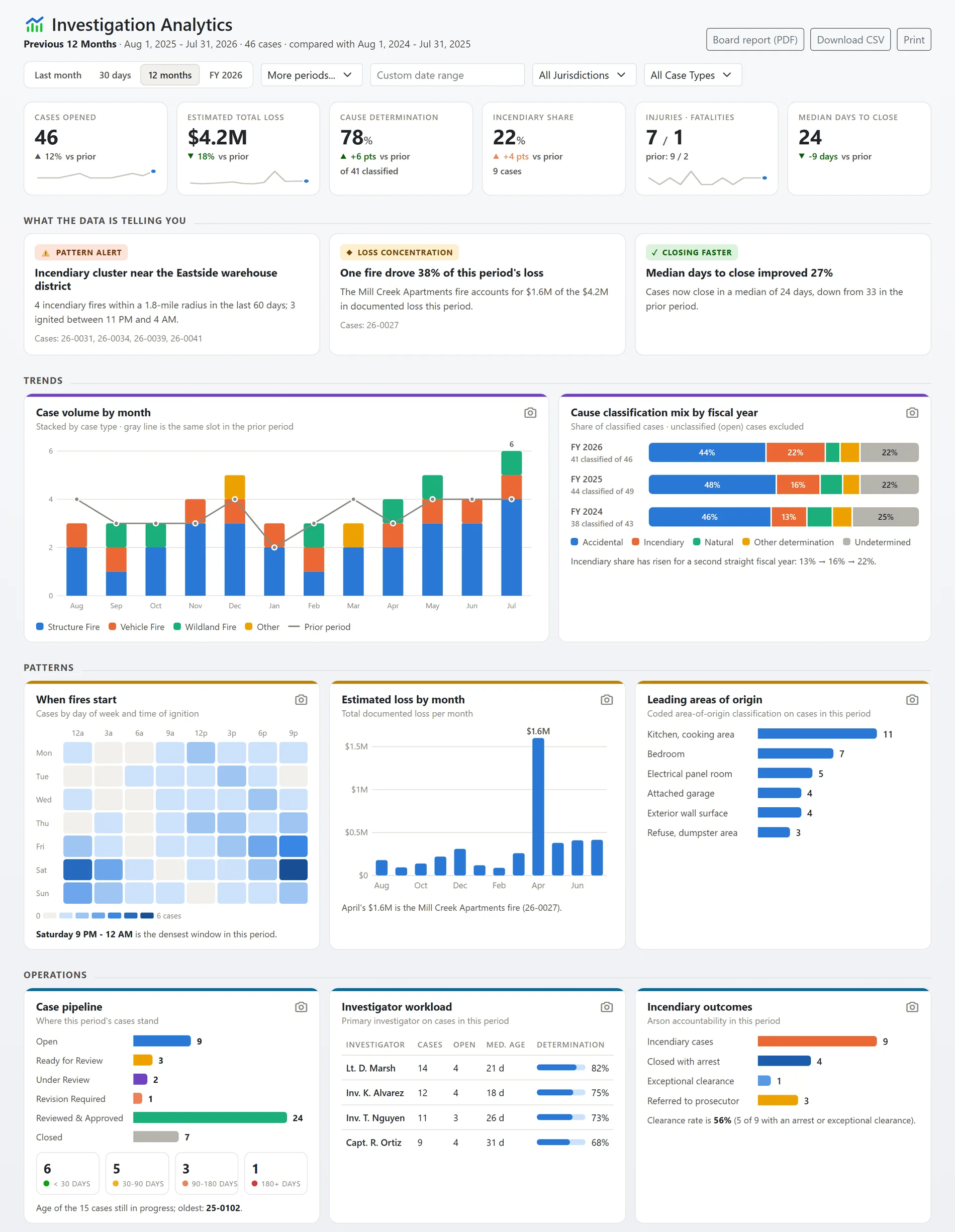
The full Investigation Analytics page, shown with sample data. Every department gets this view of its own cases.
Shown with sample data. Click the image to see the whole page.
A timeline that builds itself.
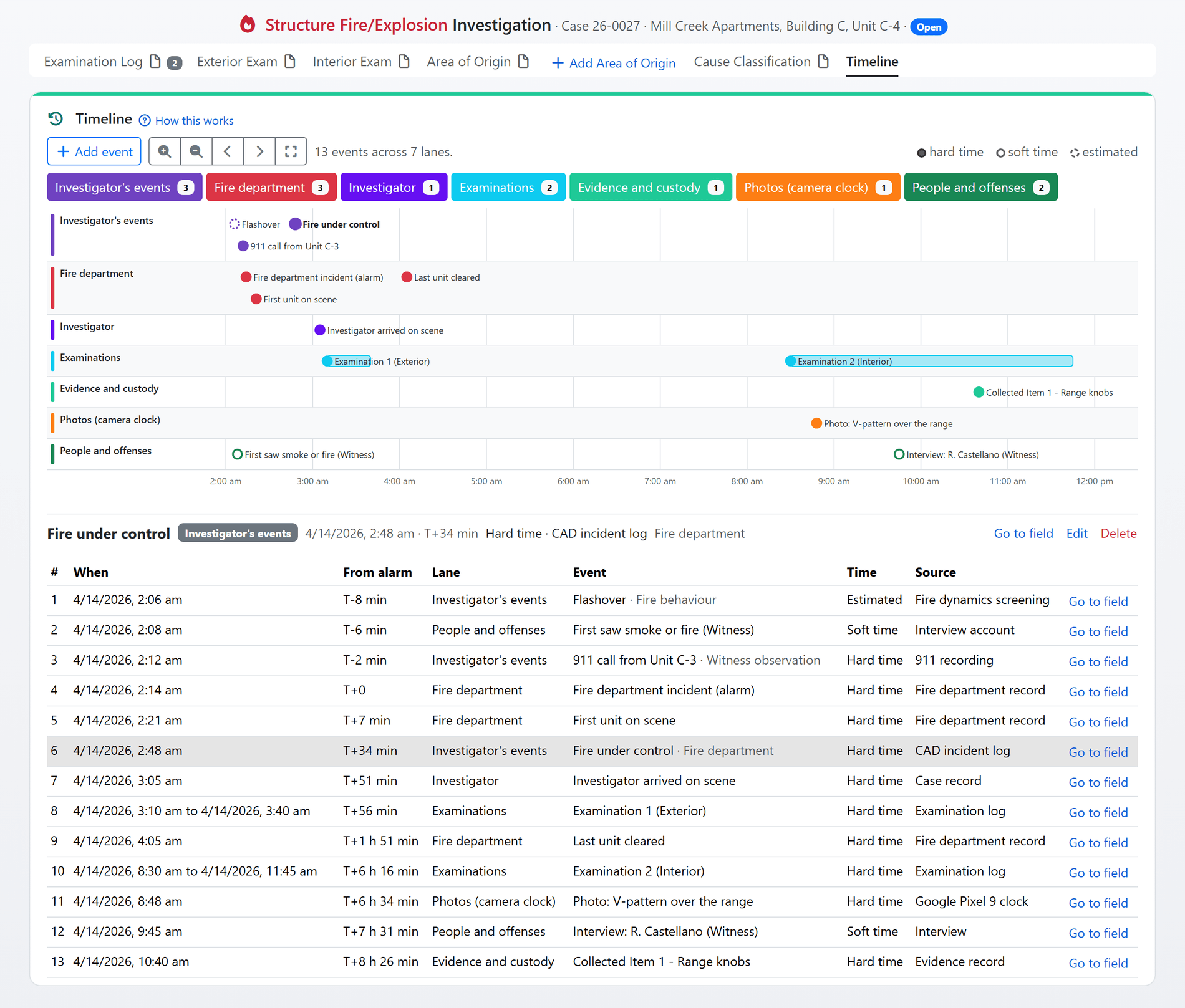
Every dated fact on the case already tells part of the story. Version 2.0 derives eleven timeline lanes from them automatically: the alarm and the fire department's response, examinations, interviews, evidence custody, casualties, photographs and more. Add your own events with a confidence and a source, and the same timeline prints as a figure in the report with every event's time after the alarm.
- Eleven derived lanes: a lane appears the moment the record holds something for it, and every event names the field it came from.
- Hard, soft and estimated: authored events carry a confidence and a source, drawn differently, so a reviewer sees which times are established and which are inferred.
- T+ from the alarm: select any event and read its time relative to the alarm, the anchor every fire timeline is judged against.
- Into the report: the timeline figure and its event table are generated for Word and PDF reports from the same record.
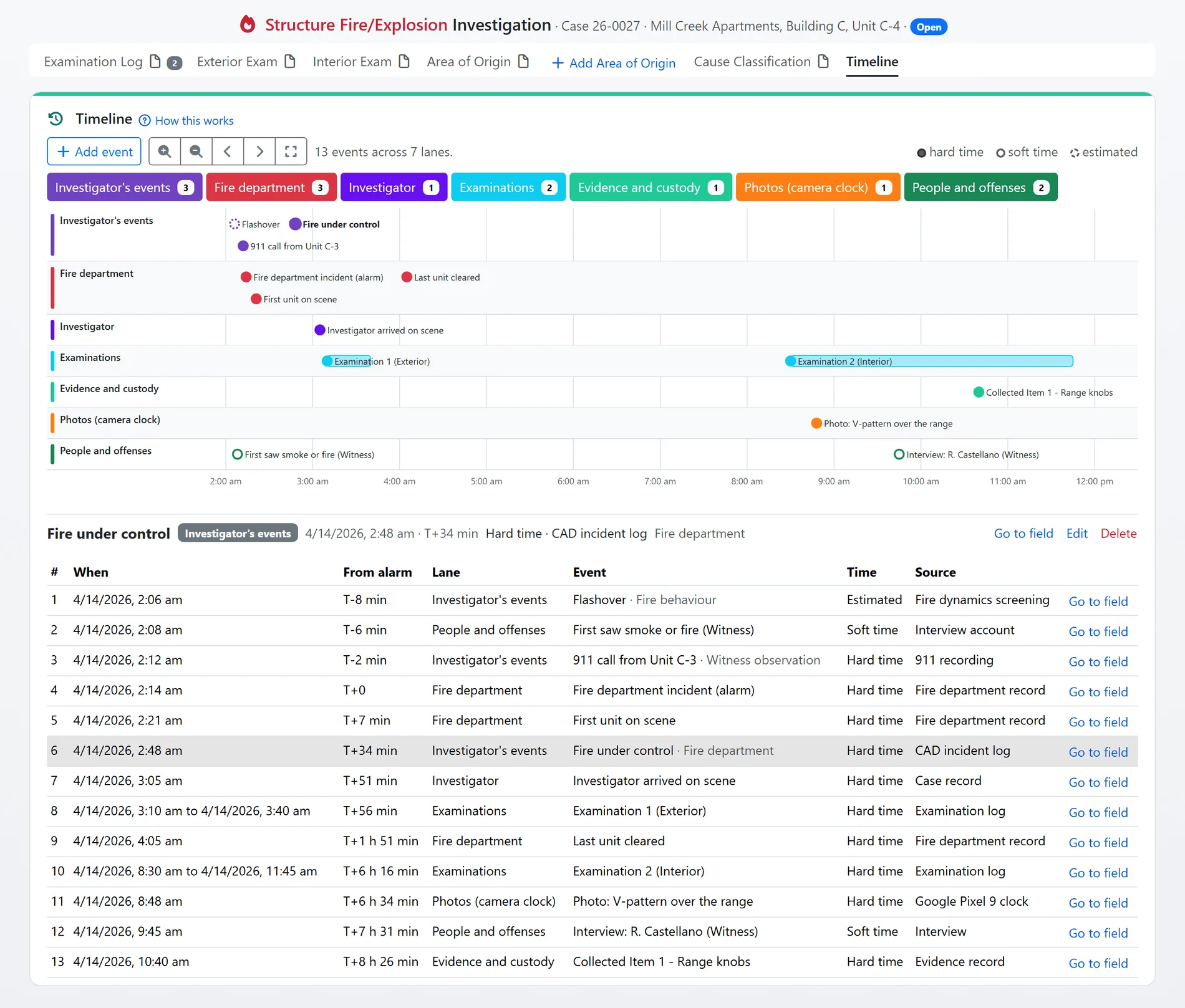
The case timeline, shown with sample data.
Shown with sample data. Click the image to see the whole page.
Ignition scenarios, considered and eliminated.
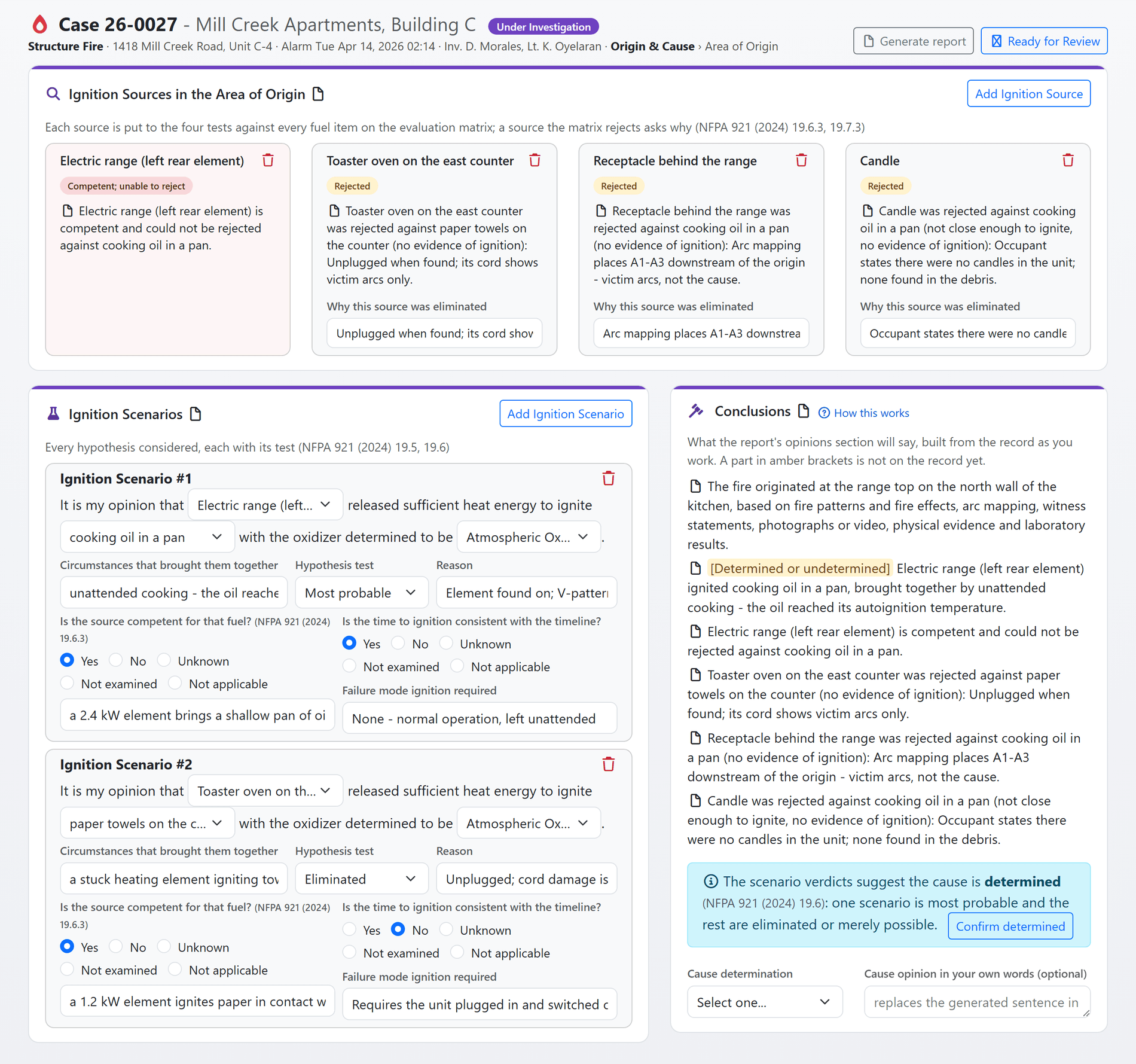
NFPA 921 asks the investigator to consider every competent ignition source, test each scenario, and say why the others were eliminated. Version 2.0 makes that the shape of the page. A source the evaluation matrix rejects asks for its elimination basis. Every scenario carries the 19.6.3 questions and a verdict. The record then suggests Determined or Undetermined under 19.6.5.1 and 19.7.4 from those verdicts, and the investigator confirms.
- Sources considered and eliminated: each ignition source is evaluated against every fuel item, and a rejected source records the basis for its elimination. The report prints what was considered and why it was ruled out.
- Scenarios tested the 19.6.3 way: was the source competent, and on what basis? Is the timing consistent? What was the failure mode? Each scenario ends in a verdict: Most probable, Cannot be eliminated, or Eliminated with its reason.
- The record suggests the determination: two survivors, or a lone merely-possible survivor, reads Undetermined under the standard. One most-probable scenario reads Determined. The investigator confirms; the page never writes it alone.
- Live origin and cause statements: the sentences the report will print are shown as you work, with any missing part marked in amber, so the conclusion is finished before the report is generated.
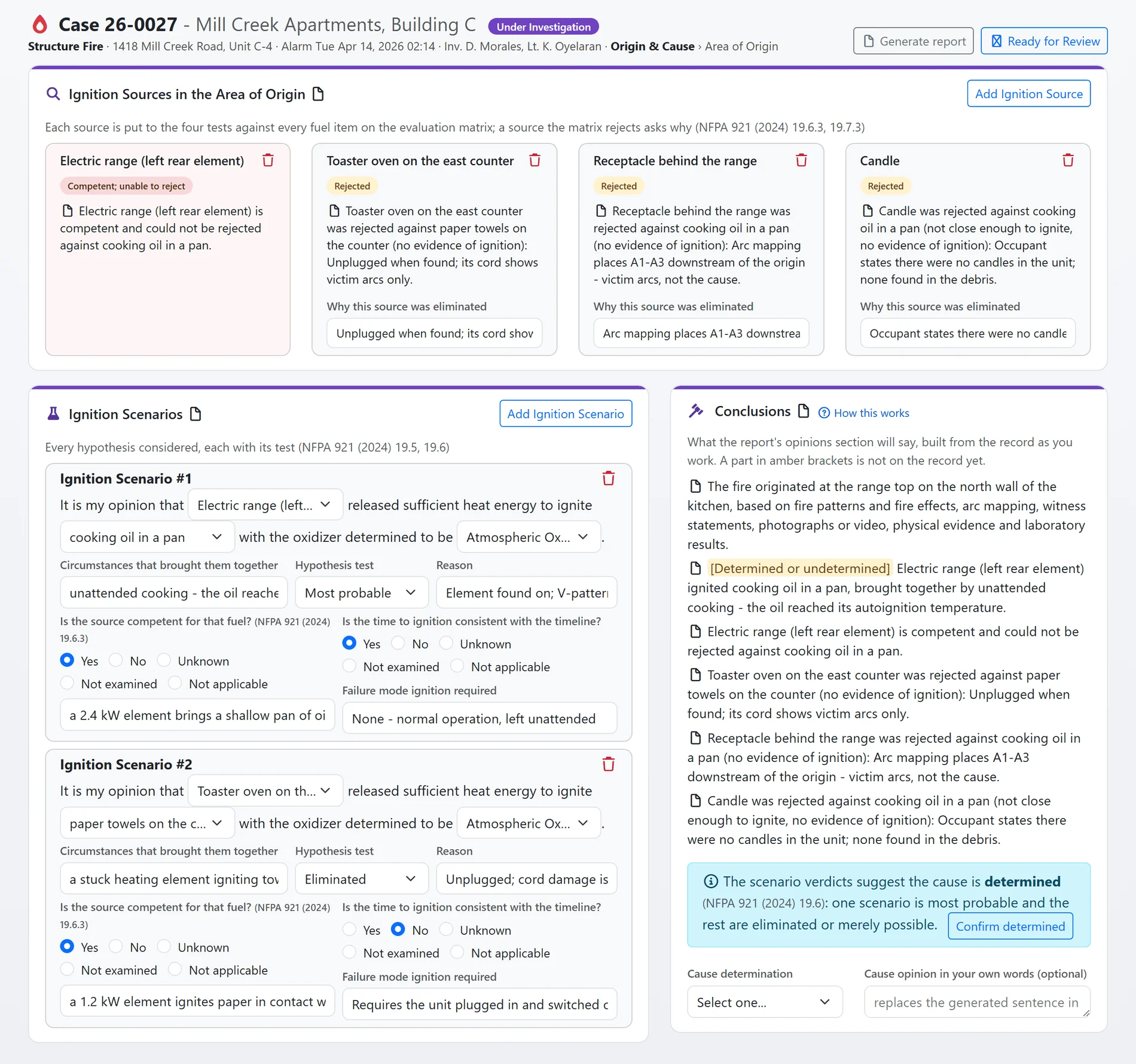
Ignition sources, scenarios and conclusions, shown with sample data.
Shown with sample data. Click the image to see the whole page.
Fire dynamics screening from your own sketch.
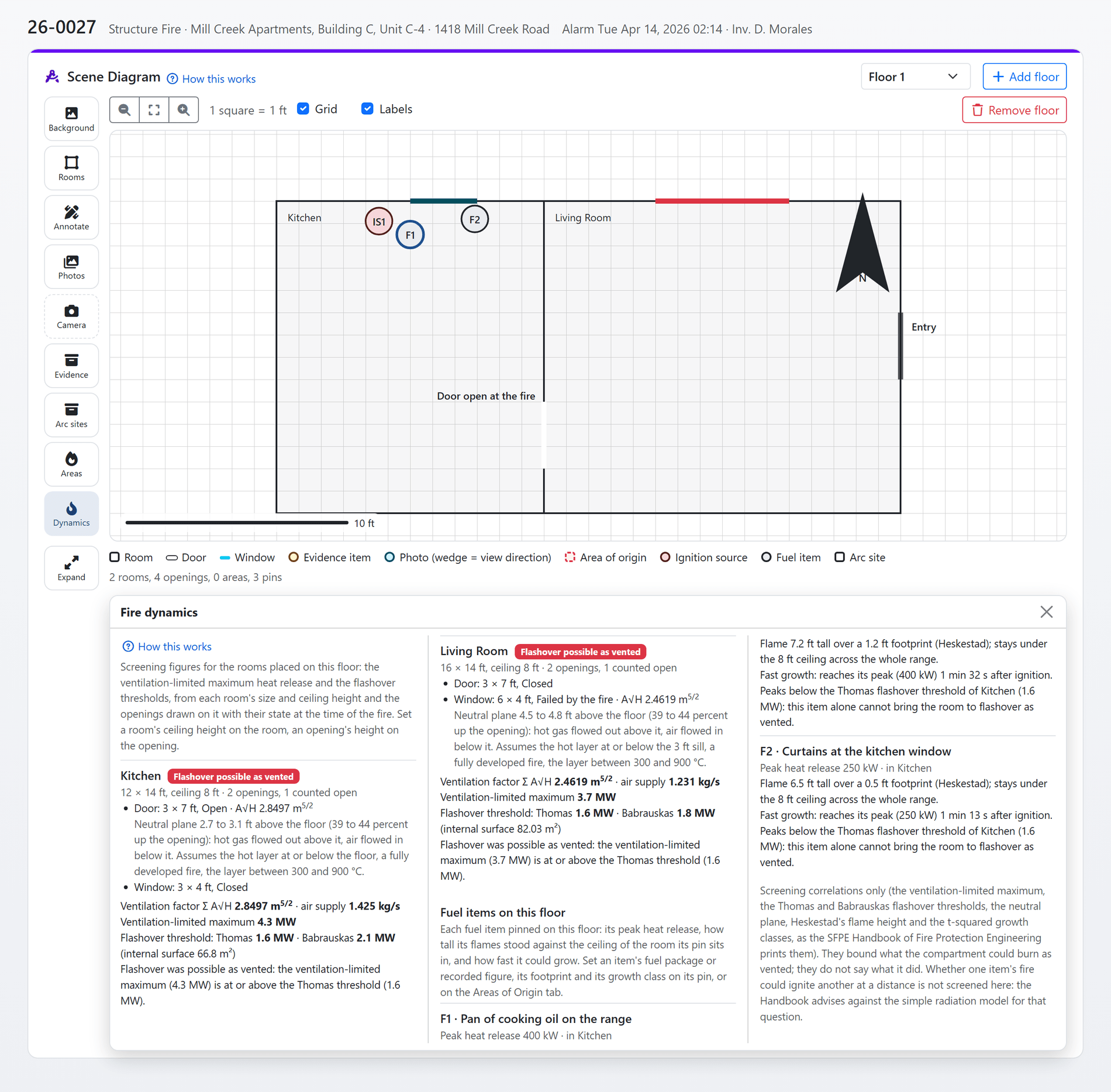
Could this room have flashed over? How long would that fuel item have taken to get there? The Dynamics tool answers with published correlations, computed from the rooms, openings and fuel items already on your sketch. Every assumption is named, every constant is cited, and a figure the record cannot support is refused rather than guessed.
- Ventilation and flashover: the ventilation factor and ventilation-limited maximum heat release from the openings drawn on the room, with the Thomas and Babrauskas flashover thresholds and a verdict for each: "Flashover possible as vented", or not.
- Neutral plane and flame height: the neutral plane of every feeding opening, and the flame height of a burning item against the room's ceiling.
- Growth timing: t-squared growth for slow, medium, fast and ultrafast items: the time to peak, to the flashover threshold and to the ventilation cap.
- From the Handbook: every constant and every peak heat release range is the one the SFPE Handbook of Fire Protection Engineering or the NBS furniture calorimeter tests print, with the page on file.
- Honest by design: an unknown opening state is a named assumption. An open opening with no height refuses the figure. Nothing is silently defaulted.
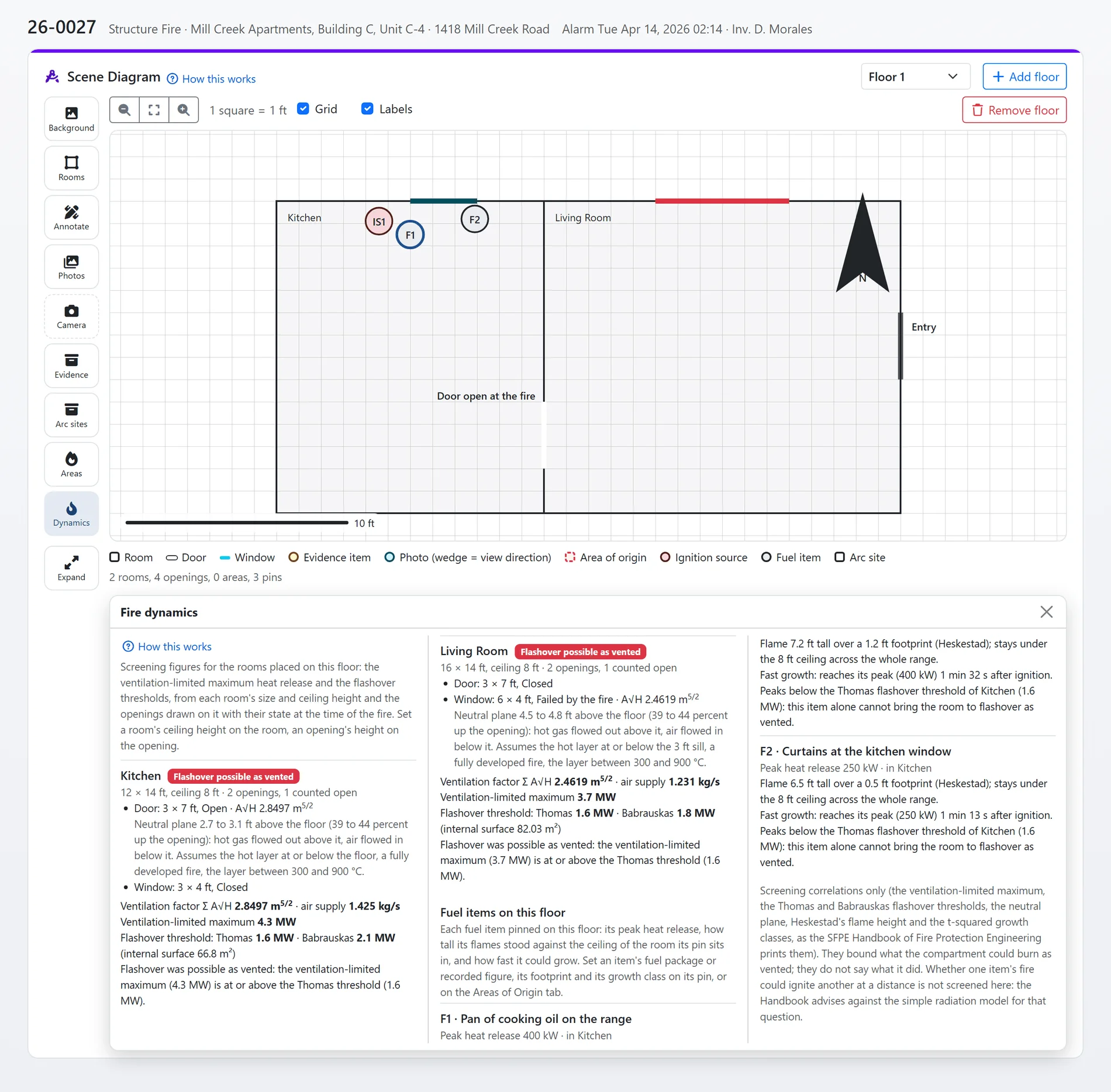
Fire dynamics screening, shown with sample data.
Shown with sample data. Click the image to see the whole page.
A panel schedule and arc mapping that read like the panel.
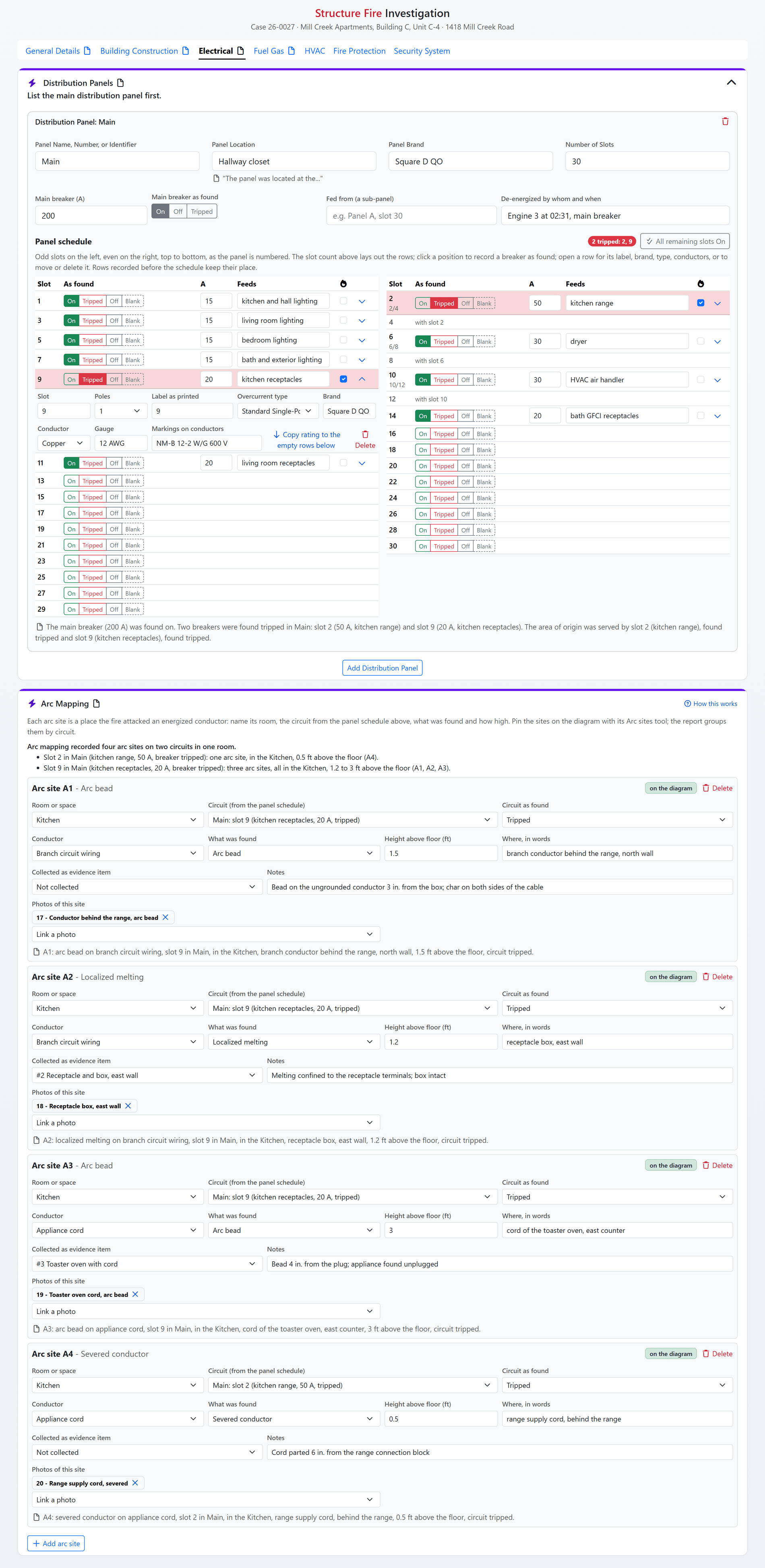
The distribution panel is entered as a schedule, slot by slot, odd left and even right, exactly as you read it at the scene: the position each breaker was found in, its rating and what it serves. Arc mapping sits on top of it. Each arc site names its room, its panel and its circuit, and the page writes the per-circuit findings for you.
- The schedule is the panel: one row per slot with the position as found, rating, what it feeds and an origin flag. Tap a chip on an empty slot and the circuit is created. The main breaker, dead-front and directory photos live on the same card.
- Tripped breakers, called out: the tripped sentence and the origin-circuit sentence are generated from the rows, ready for the report.
- Arc sites numbered and grouped: A1, A2, A3 and on, numbered by the server, each with its conductor, finding, height above the floor and the circuit as found, grouped per circuit with a written summary.
- On the sketch and in readiness: arc sites pin on the diagram in their own color, the room card counts them, and the arc survey is a readiness step for every structure fire.
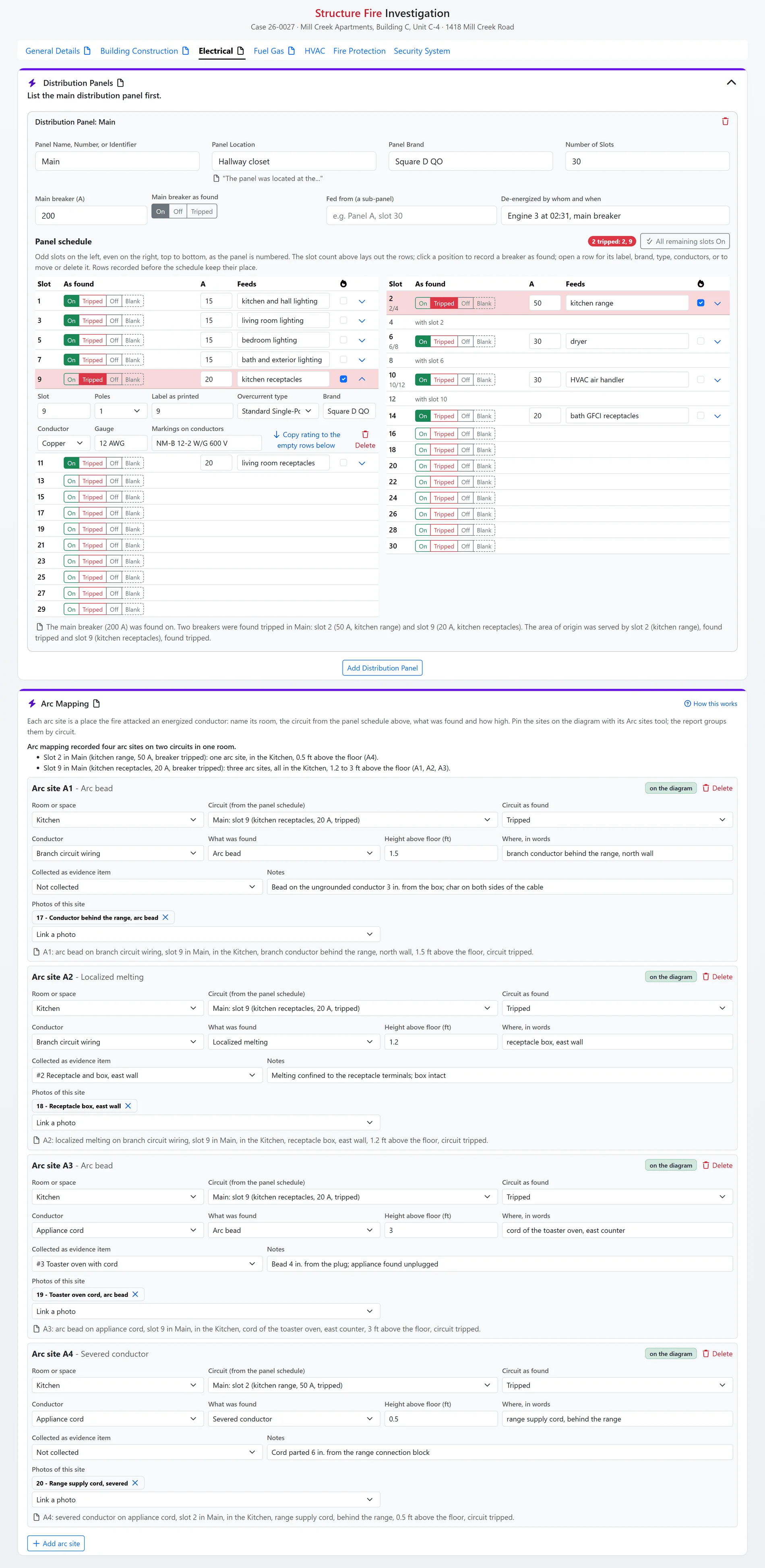
The panel schedule and arc mapping, shown with sample data.
Shown with sample data. Click the image to see the whole page.
Know how ready the case is, at a glance.
A complete, defensible investigation shows its work. The Readiness tab lists the steps that work consists of, derived from the record wherever it can be: the scene sketched, the photos logged, the patterns interpreted and correlated, the interviews with substance, evidence in custody, the scenario decided, the cause stated. The sidebar ring shows the score on every tab.
- Derived, not ticked: most steps read done from the record itself, and say why in one line: "4 pattern records with a shape named", "not yet interviewed: Firefighters". Only two scene practices are marked by hand, any step can be marked not applicable with a note, and every step links to the field that satisfies it.
- Follows the case type: structure, vehicle and wildland cases each see the steps that apply to them, and an incendiary fire adds its criminal referral step.
- Feeds the review: reviewers see the readiness step that answers each review question and confirm it. The record suggests, the reviewer answers.
- Ready for review advice: moving the case forward shows what is still open, and the report lists the readiness steps beside the findings.
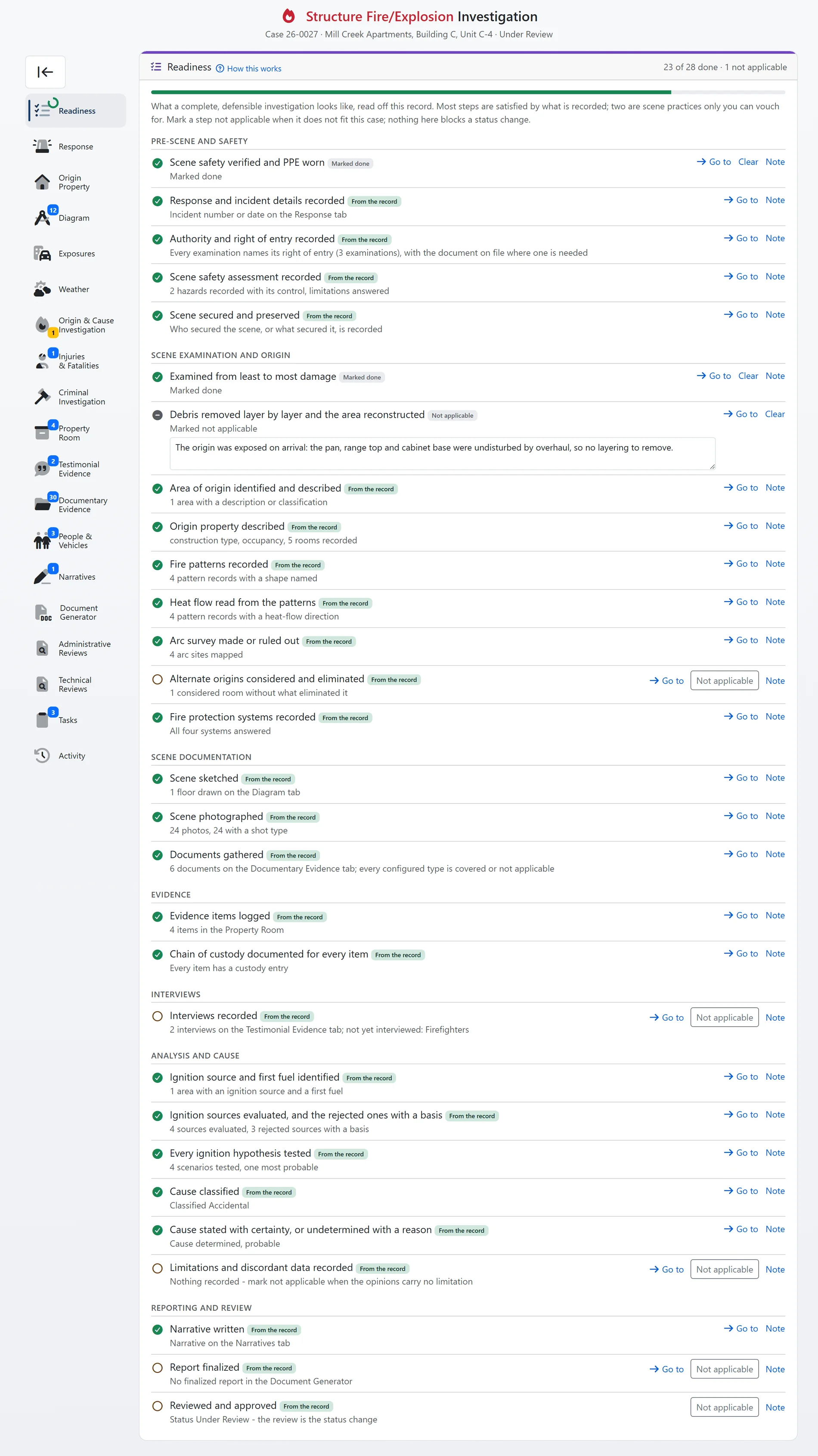
Case readiness, shown with sample data.
Shown with sample data. Click the image to see the whole page.
The report tells you what it still needs.
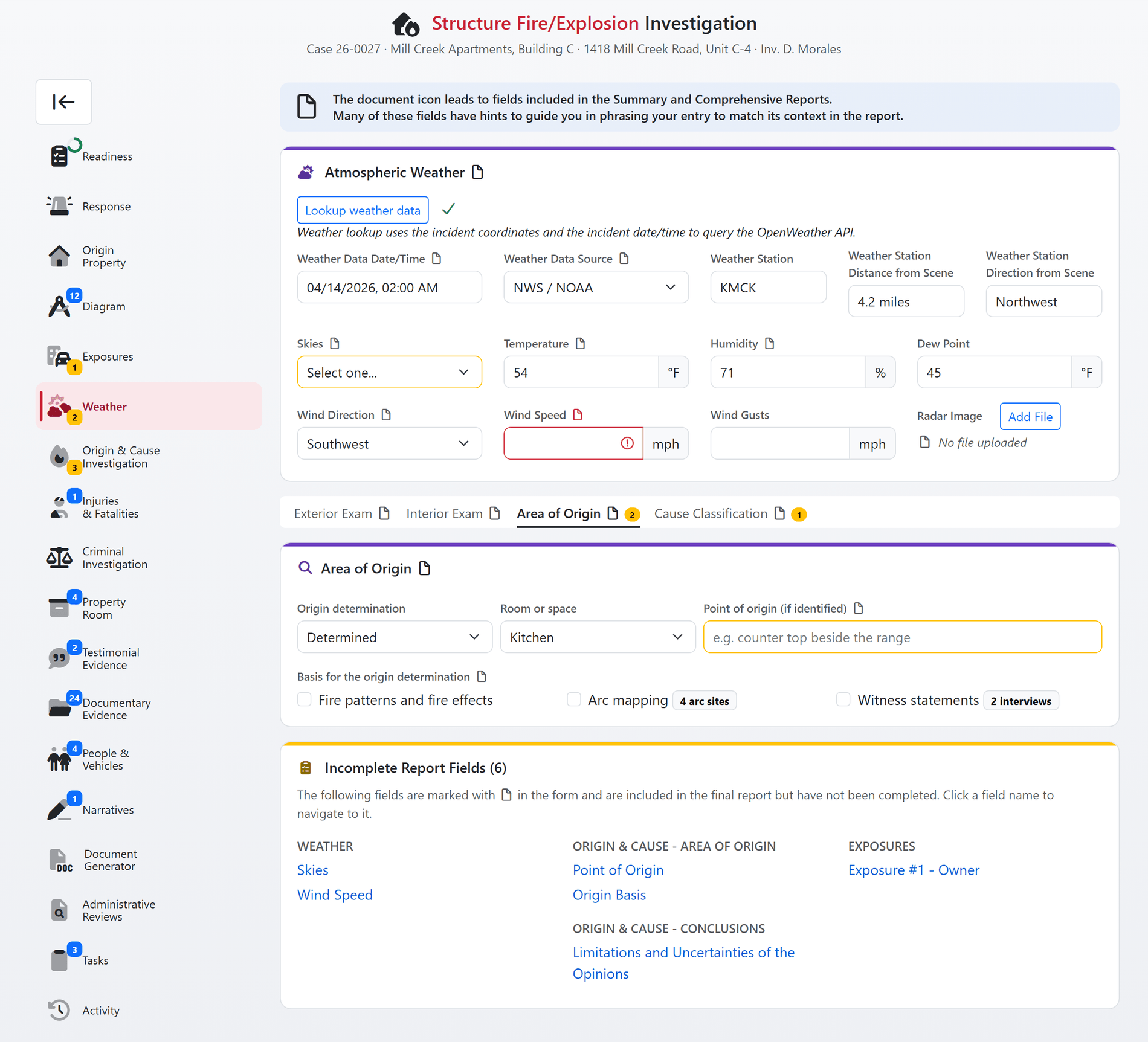
Version 2.0 reads your department's own report templates and marks, on the form, every field a template prints. An amber document icon beside a label means the report will print a blank there. Each tab carries its count, the Incomplete Report Fields card lists them with a link to each, and the generated origin and cause sentences count too.
- Follows your templates: upload a template and the page learns what it prints. Fields no template prints are never nagged about.
- Marked where you type: the icon sits on the label, amber while the field is empty, red once a report is requested or the case is sent for review.
- Counted per tab: the sidebar shows how many report fields each tab and sub-tab still owes, and the card links straight to each one.
- Sentences count too: a cause statement or origin statement with a missing part is an incomplete field, the same as a blank date.
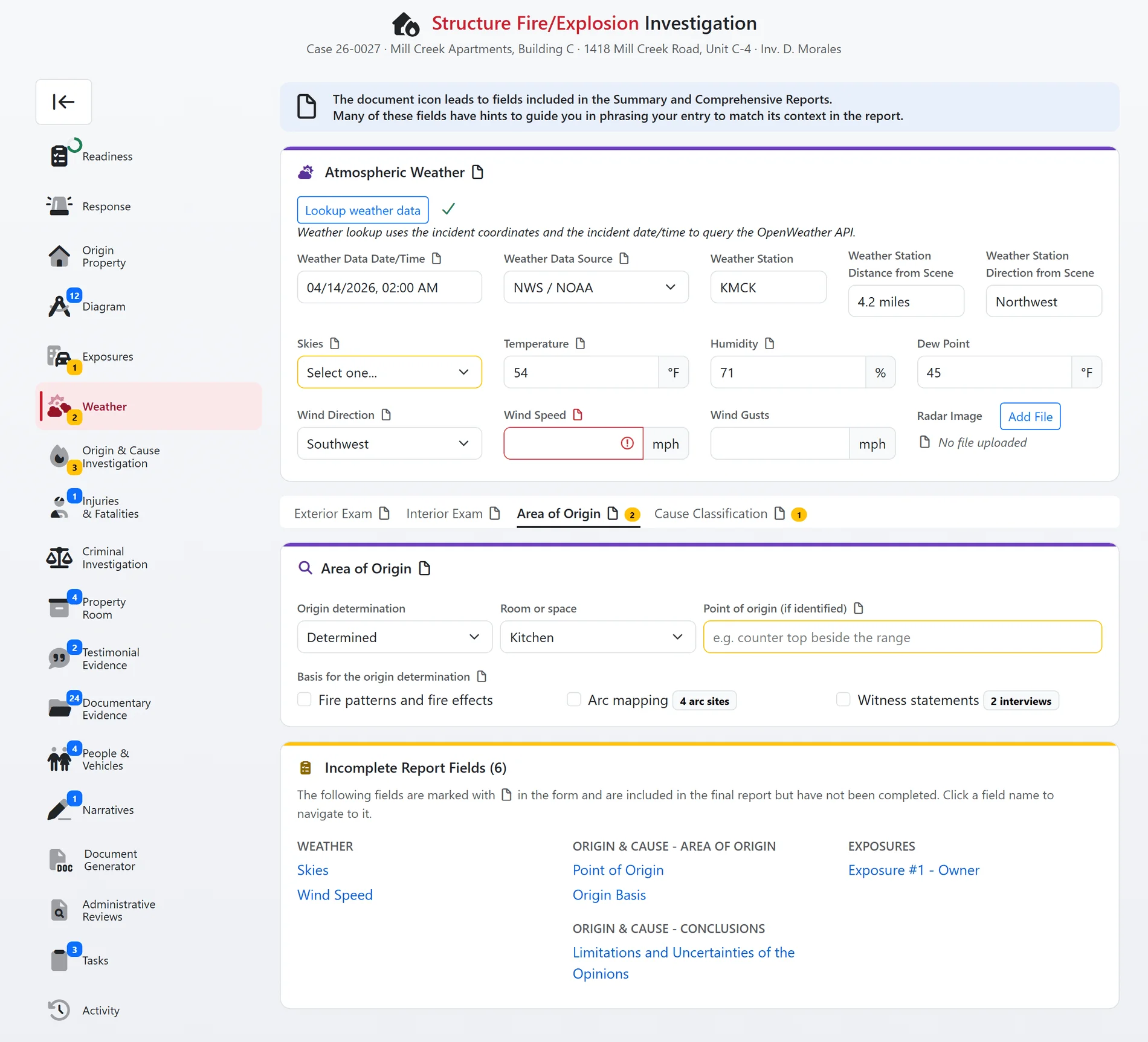
Incomplete report field marks, shown with sample data.
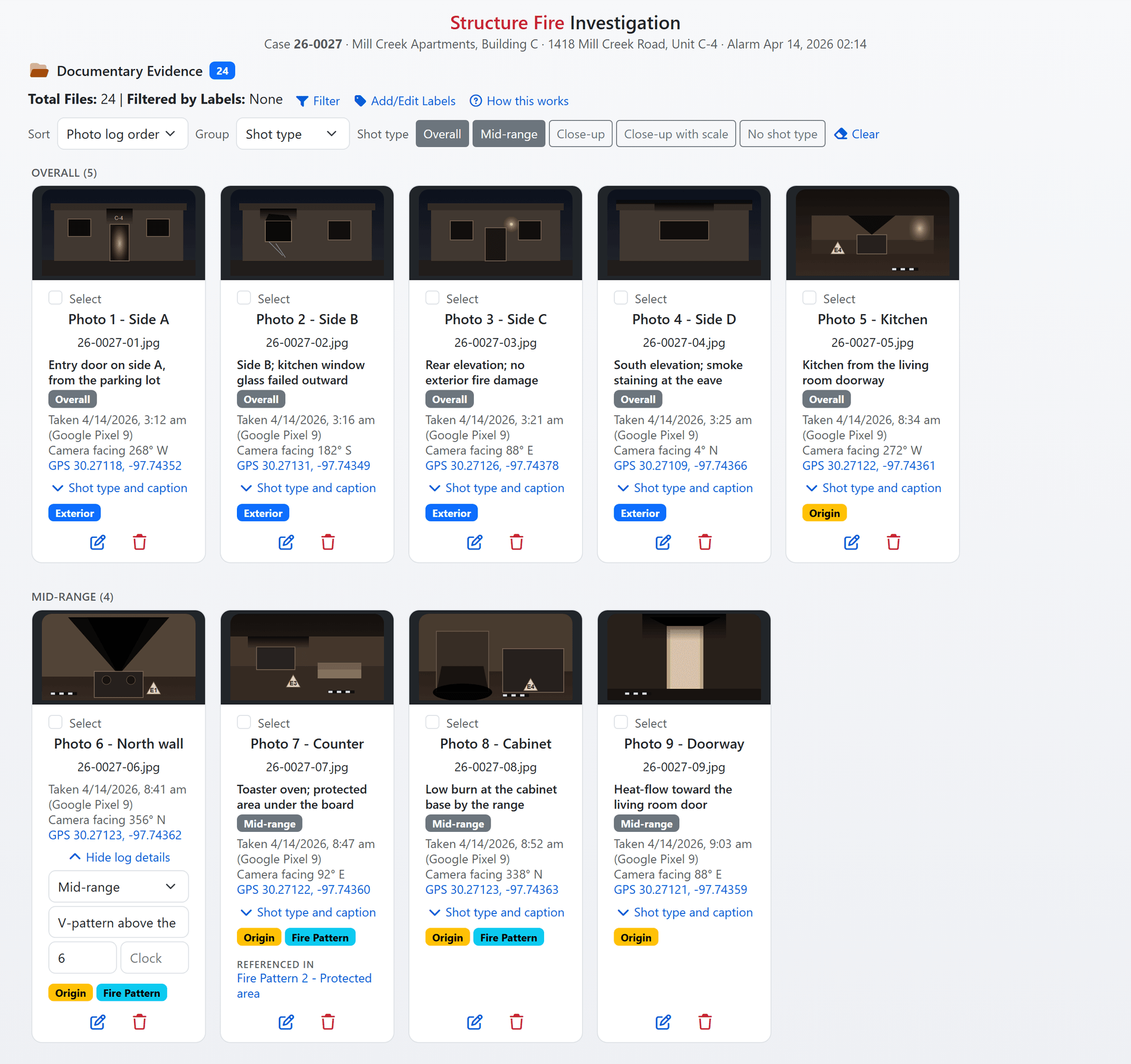
Shown with sample data and placeholder images. Click the image to see the whole page.
A real photo log, built as you upload.
Capture time, camera, compass bearing and GPS position are read from each photograph the moment it is uploaded, before it ever leaves the browser. Give each photo a shot type and a caption, and the log orders, numbers and groups itself the way NFPA 921 expects a scene to be documented.
- Capture data from the camera: the taken-at time, the camera, the bearing the lens was facing and the coordinates come from the image file. A batch clock correction fixes a camera that was set wrong without rewriting the original.
- Shot types and captions: overall, mid-range, close-up and close-up with scale, with a caption per photo, a filter for each type, and grouping by shot type, day taken or label.
- One order everywhere: the order you see on the Documentary Evidence tab is the order the Photo Log PDF prints, numbered as exhibits, with a per-photo log number you can adjust.
- Photos everywhere they belong: link photos to a side of the building, a room, a fire pattern, an arc site or an evidence item, and pin them on the sketch.
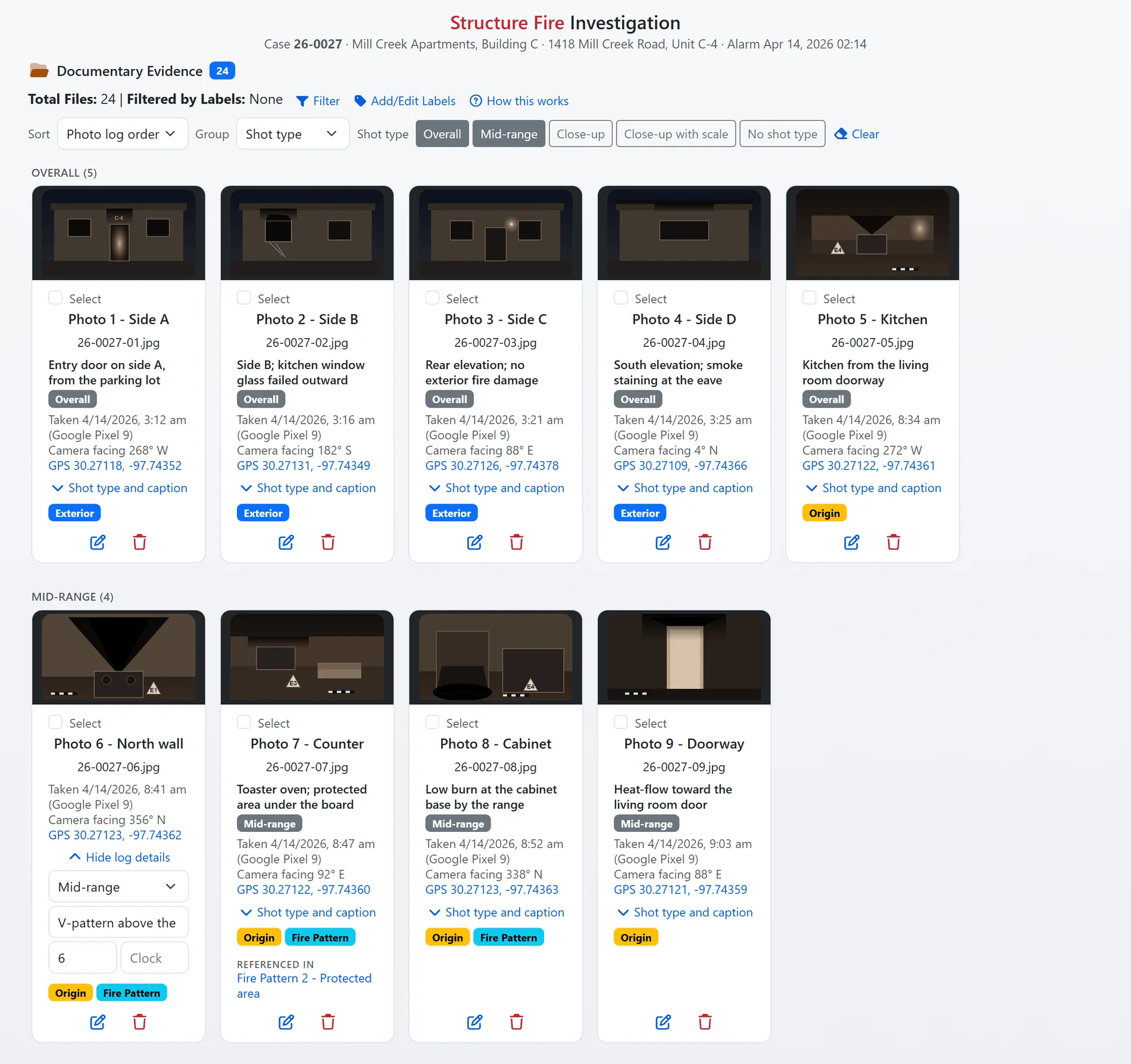
The photo log, shown with sample data and placeholder images.
And that is only the start
Version 2.0 rebuilt the case page section by section. Here is the rest of what your investigators get the day they open it.
Interviews as records
Fourteen roles in eight groups, the method, consent and recording clock, interpreter, guardian for a juvenile, custodial and Miranda facts, statements and signatures. A prompt sheet per role instead of forty blank questions.
People and vehicles across cases
The same person or vehicle on an earlier case is found and copied in with one click. License and VIN barcodes scan from the camera, with a check-digit-verified VIN and a lookup preview you approve before anything is written.
Criminal investigation and prosecution
A department offense catalogue, suspect-to-offender tracking, a status suggested from the actions taken, NIBRS offense, weapon and relationship tables, and prosecution followed through referral, charges, court dates and disposition.
Property room, rebuilt
Transfer reasons, custody in time order, batch transfers with a receipt, QR labels and server-assigned item numbers that are never reused.
Examination log
When and where each examination happened, the authority and right of entry with its document, scene safety hazards with control tiers, security, and a live roster with time on scene.
Report editor
Arrange and edit your own Summary and Comprehensive reports on a page: change the words, drag sections into order, add or remove parts, with the case's facts kept in place. Your Word templates stay yours and keep their look; nothing prints differently until you say so.
Exam and area-of-origin answers
A damage ladder per side, openings and photos per side, a room-by-room exam card that writes the least-to-most summary, origin determination with its basis, and an NFIRS area code suggested from the room.
Wildland indicators
Fire-spread indicators recorded with their bearing and a circular-mean agreement rollup, the spread facts with the weather tab's own wind, and indicator arrows on the sketch.
Casualties that respect time
An injury that becomes a fatality carries its facts forward and stops double counting, with the injury and pronouncement clocks kept apart.
Reviews hinted from the facts
One administrative and technical review question list, with department hide and reword overrides, and the readiness step that answers each question shown beneath it for the reviewer to confirm.
A page that gets out of the way
A color-coded restyle, a phone-friendly layout, a save capsule showing what is pending and saved, three-state answers with a reason for Not examined, peer edits offered rather than overwriting yours, in-page confirmations with undo, and no browser pop-ups anywhere.
How this works, everywhere
Every new tool carries an explanation built from the same rules the tool runs on, collected in a browsable Investigation Tools guide for your whole department.

Shown with sample data.
Court-ready reporting in minutes.
Stop spending hours compiling reports. The software combines all collected data into a custom, professional report specific to your investigation. Narratives, photos, the scene sketch, the timeline, the fire patterns, the sources considered and the conclusions merge into a final document ready for submission, in your department's own template, arranged the way you want it in the report editor.
- Automated report generation: instantly create custom, professional reports that combine all case data into a final, court-ready document.
- Generated where it matters: the origin and cause statements, the pattern sentences, the tripped-breaker findings and the arc mapping summary are written from the record, the same way on every case.
- Figures, not screenshots: the scene sketch with its key, the timeline and the photo log are rendered from the record into Word and PDF.
- Everything included: all narratives, photos and findings are automatically part of the final report, with no manual data entry.
Run Investigations on your own cases.
A one-hour walkthrough with a fire prevention expert, or the demo site right now. Nothing to install and nothing to migrate: existing clients already have Version 2.0, and new departments get a free three-month trial with no obligation.