
Every ITM report filed free. Every system's standing, known.
Sprinkler, alarm, hood and pump contractors file their inspection, testing and maintenance reports through one page at no charge. Your staff verify each one against the document, the property record shows which systems are current, due soon, past due or tagged, and owners are notified under your own policy.

An ITM module bolted onto a response RMS cannot do this job.
Third-party reports arrive as PDFs in an inbox, get filed against the wrong building, and nothing on the property says the sprinkler system is past due until the next inspection finds out. This module was built for the contractor, the fire marshal and the owner at once.
An emailed PDF is a file, not a record
Unless somebody re-keys the findings, no system is tagged, no inspection clock restarts and no owner is told.
The contractor enters each finding with its severity in a one-page form, and accepting the report is what posts it to the property.
A due date does not belong in a spreadsheet
Which sprinkler system is past its annual, and which alarm its quarterly, is a column somebody keeps by hand for every building in town.
Each system carries its own clocks, annual, semi-annual, quarterly and five-year, and the property says a system is past due the day one runs out.
Notices depend on someone remembering
The owner is told about an open deficiency when an inspector notices it, if anyone does.
Your policy says when the first notice goes and how often it repeats, per severity. The nightly job sends it, numbers it per system, and records every delivery on the property.
Shown with sample data. Click the image to see the whole page.
Contractors file in one page, for free.
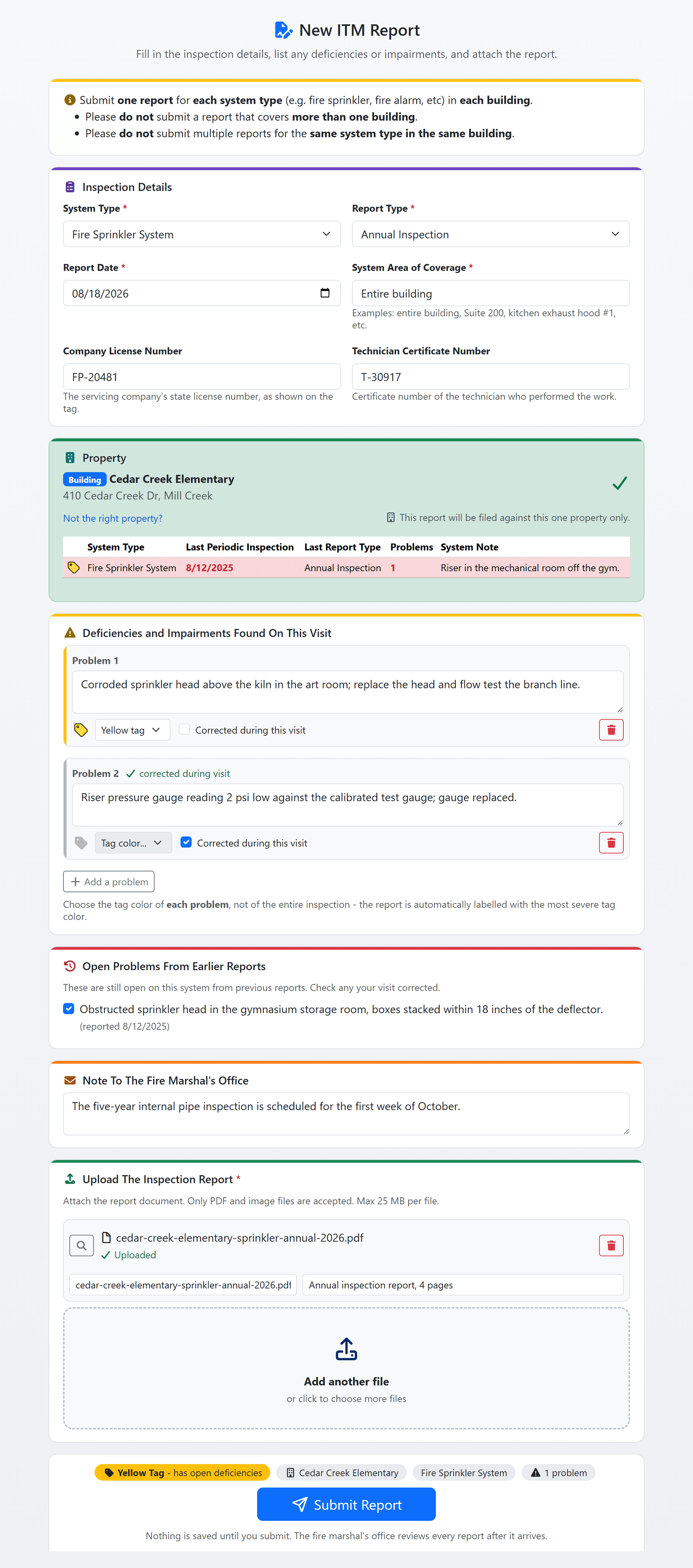
A contractor fills in one page: the system type, the report type and date, the property, the findings and the report document itself. Nothing is saved until they press Submit, the report enters your verification queue, and the contractor is emailed a confirmation. There is no fee for the contractor, and the report is a record on the property the moment your staff accept it.
- The property from your records: searched by name or address and filtered to the property levels the system type applies to. When the contractor cannot find it, they type the address and your staff attach the report at verification.
- A severity on every finding: each deficiency or impairment gets its own tag, and the report is labelled with the most severe finding still open on it, never a severity chosen for the report as a whole.
- What is already on file: the property's systems appear on the form with their last inspection and open findings, so a visit that corrected an earlier finding ticks it there, and a duplicate report is caught before it is sent.
- One report, one system, one building: the form refuses a second unfinished report for the same system at the same property, and the draft stays on the contractor's device so nothing half-finished sits in your queue.
- Credentials where your state requires them: the company licence number and the technician certificate number, collected, required or not asked for, as your department decides.
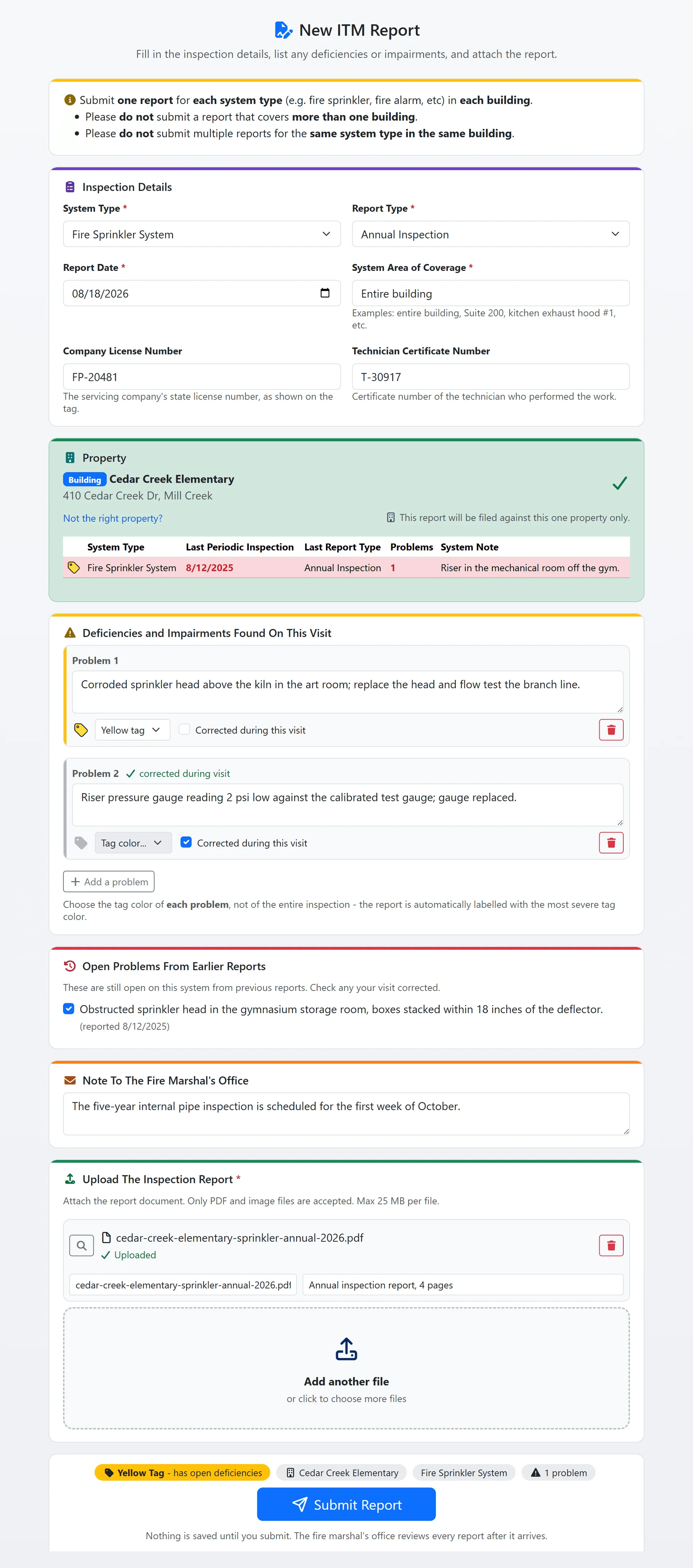
The contractor's one-page report form, shown with sample data.
Shown with sample data. Click the image to see the whole page.
Every system's standing and next due date, on the property.
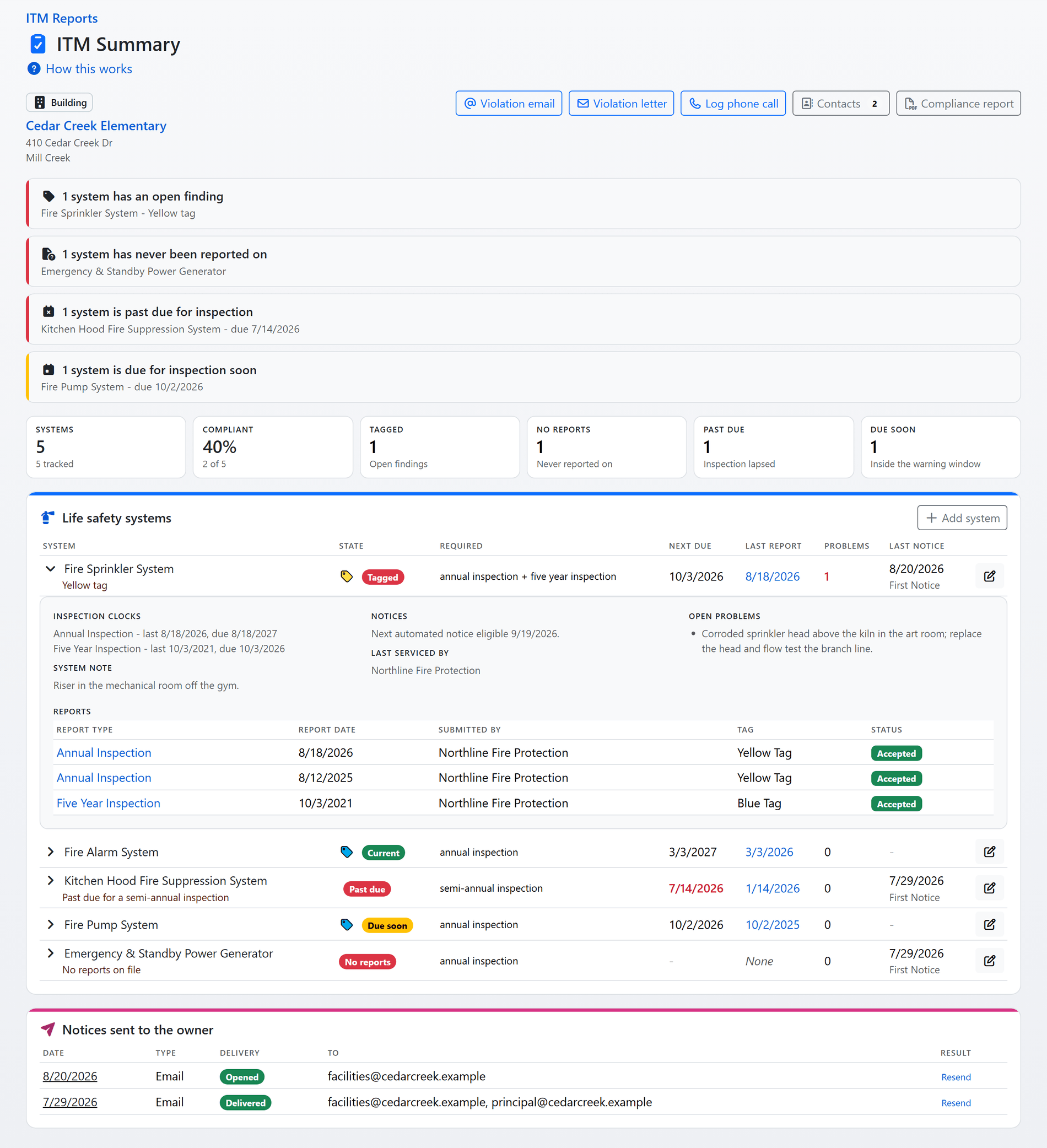
Accepted reports feed each system's inspection clocks. The property's ITM summary shows every system with the one state that applies, the reason behind it and the date the next inspection is due, worked out from the reports on file every time the page is opened, so nothing is stored that could go stale.
- Six states, most urgent first: Tagged, No reports, Past due, Due soon, Current and Not tracked. Tiles count the ones that need attention, and the rows at the top name the systems that need somebody.
- Clocks per system type: a system type can carry more than one clock, such as an annual and a five-year, and it is past due when any of them runs out. An installation report restarts every clock, and the warning window opens 30 days before a clock runs out unless the clock sets its own.
- Sites and buildings together: a site's summary groups the systems of each building, and a site's notice covers its buildings' systems and their contacts.
- The whole story in one document: a compliance report PDF for an owner or a council, and a status page per property on the public portal showing each system's last report and open findings.
- Delivery you can see: every notice sent to the owner is listed with whether it was delivered or opened, and a delivery problem shows on its row.
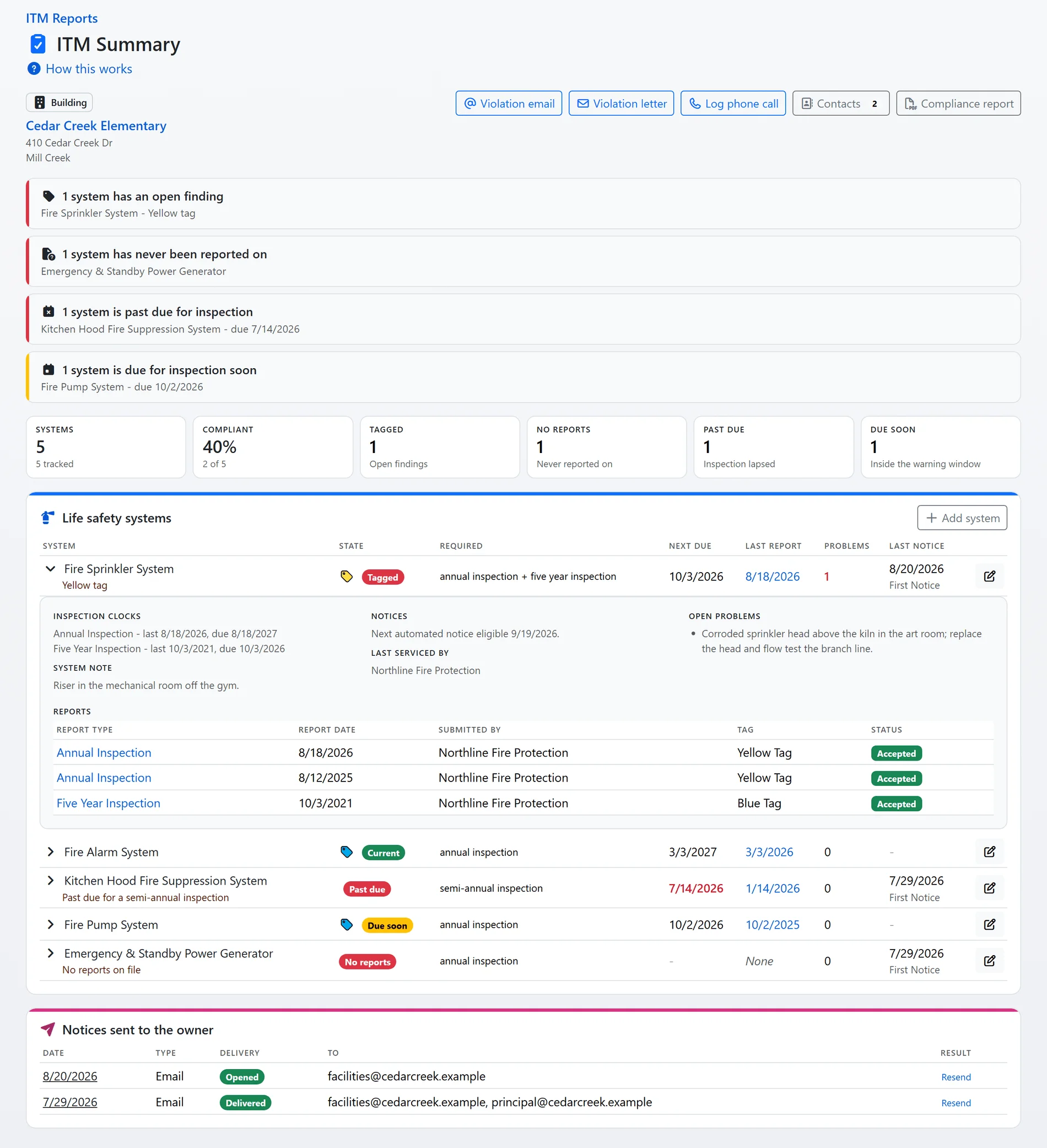
A property's ITM summary, shown with sample data.
Shown with sample data. Click the image to see the whole page.
Every finding tracked until it is corrected.
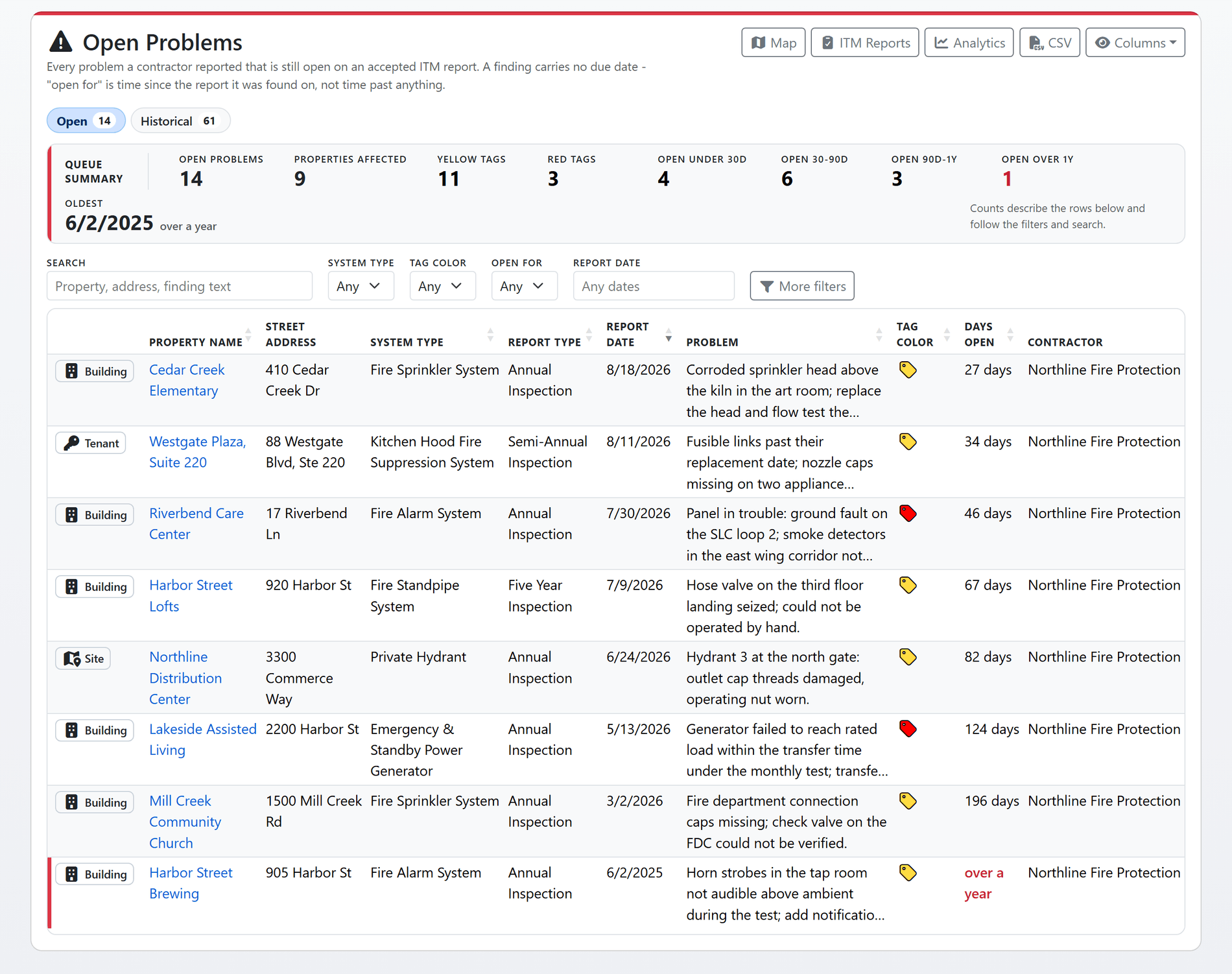
Every open deficiency or impairment on an accepted report is one row on the Open Problems queue, banded by how long it has been open and never by a due date it does not have. The tag on each row is painted in your department's own scheme, and the queue is also a worklist: a tile is a filter, a row opens the report.
- Your state's tag scheme: presets for Texas 28 TAC 34, NFPA 25 Annex G, Colorado, Oklahoma, Florida, Louisiana, NFPA 72 and the word-tag states. The wording and the tag colours follow the scheme on every form, list, statistic and notice.
- Three dispositions: Open, Corrected and Not deficient. A finding is usually corrected by a later accepted report, and the record shows which one; a finding your staff decide was never real leaves the count without counting as a correction.
- Age you can act on: under 30 days, 30 to 90, 90 days to a year and over a year, with a rail on any row open longer than that. The Historical queue adds the corrected ones and a correction rate.
- Verification with the document beside it: the contractor's own report sits next to the fields typed from it. Staff accept, return it as Incomplete with reasons the contractor is emailed, or move an accepted report back for another look.
- What needs somebody on the report list: tiles for reports waiting on verification over a week, unassigned, not yet linked to a property, returned to the contractor, or started and never submitted.
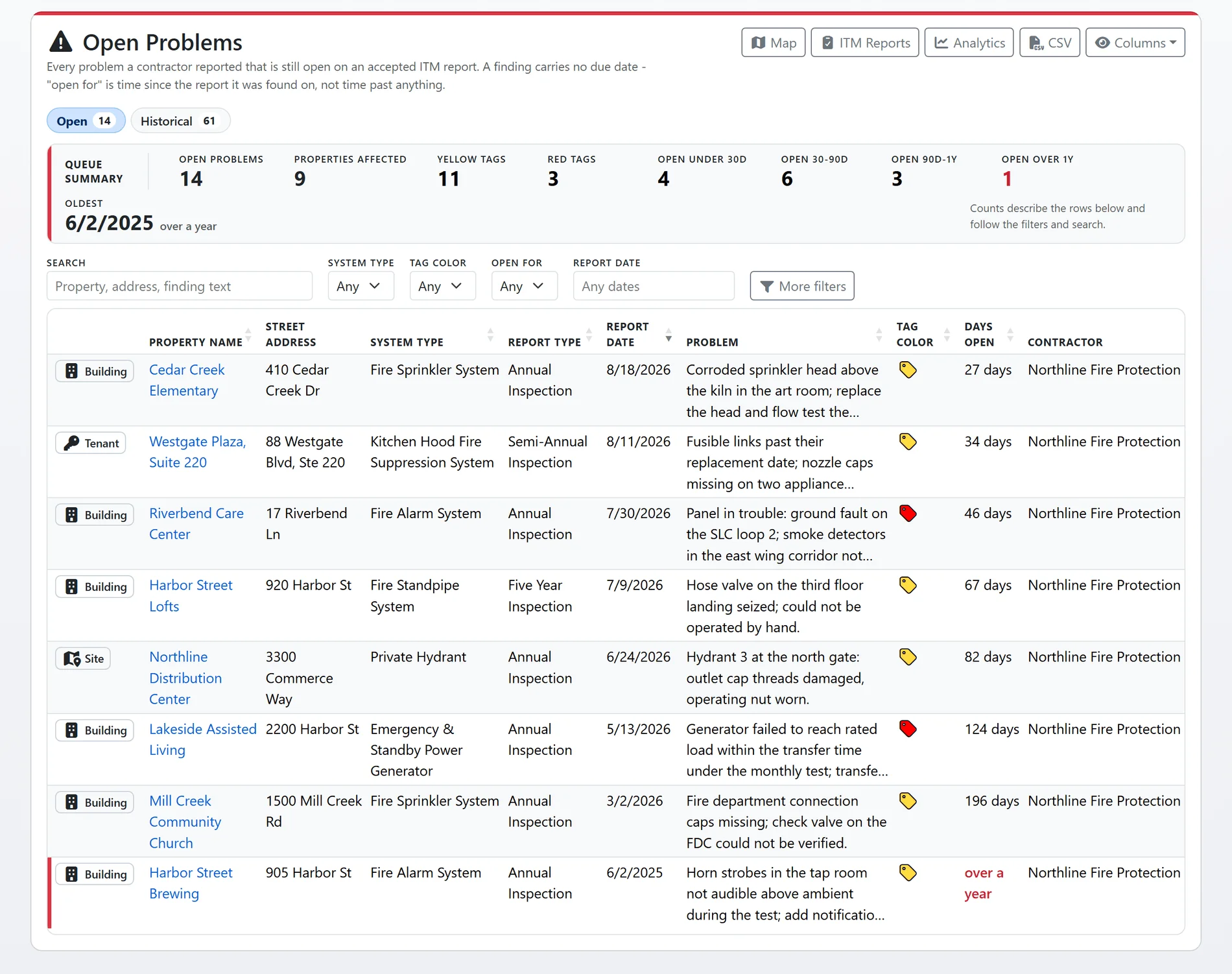
The Open Problems queue, shown with sample data.
Shown with sample data. Click the image to see the whole page.
Owners are notified under your policy, not someone's memory.
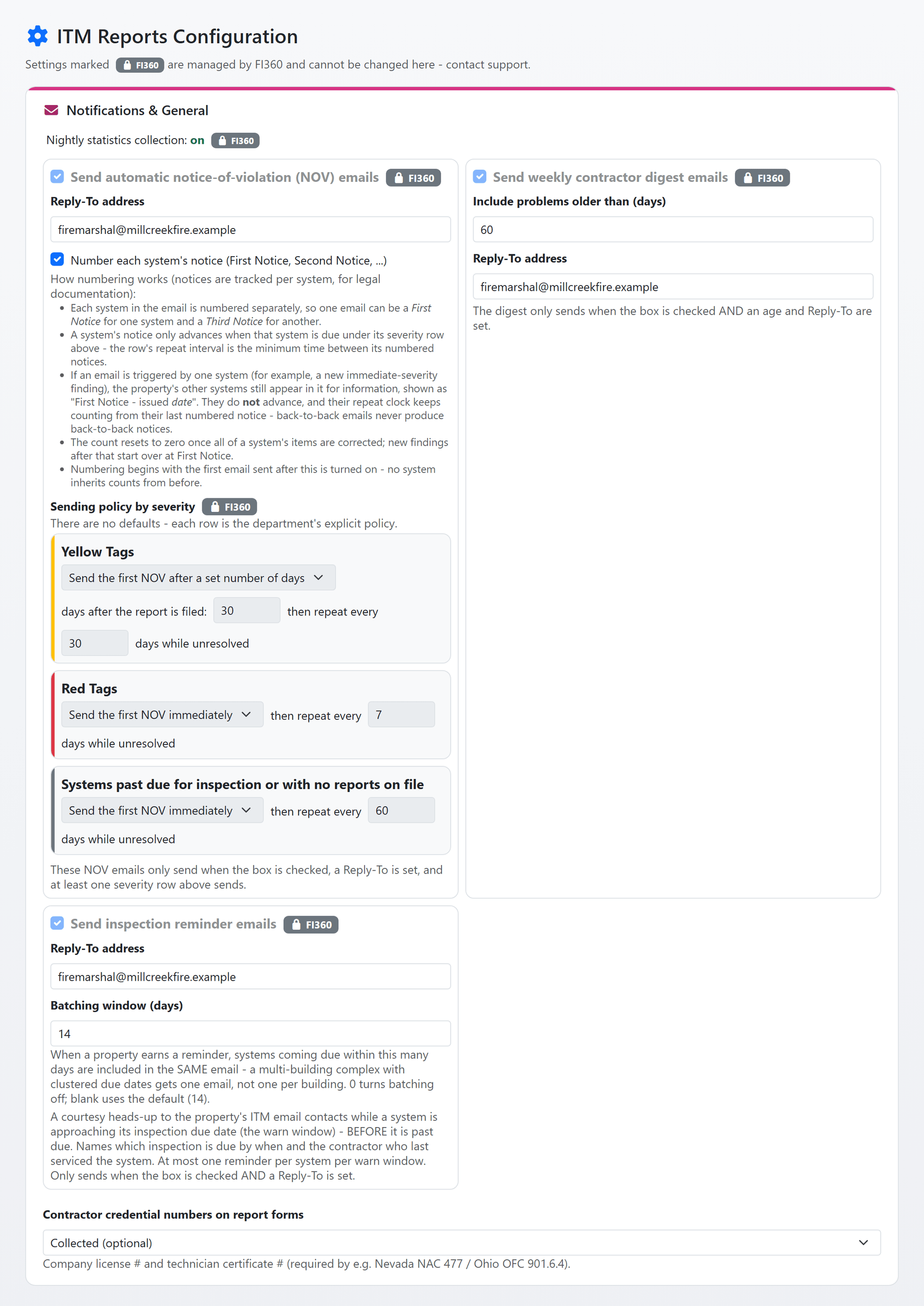
Each night FireInspection360 can email a Notice of Violation to the owner of every property with a system out of compliance: tagged, past due or never reported on. The email carries your letterhead, names each system and its open findings, quotes your requirement wording for that system type, and links to the portal page where the owner can watch the system's status.
- Your explicit policy: one row per severity plus one for systems past due or never reported, each saying when the first notice may go and how often it repeats while the problem stands. There are no defaults, and a row that says never sends nothing.
- Numbered per system: First Notice, Second Notice and so on, counted per system for the legal record and reset once the system is fully compliant again. A system riding along in another system's email never advances.
- Who is told: the property's contacts flagged for ITM notices, and for a site the flagged contacts of its buildings too. A property with nobody flagged is skipped, and the summary says so before anyone wonders why an owner was never told.
- Delivery tracked: a bounce or a spam complaint puts the address on the suppression list, and the summary warns when every address on a property is suppressed so a letter or a phone call goes instead.
- Notices your staff send: a violation email previewed before it goes, a numbered violation letter as a PDF for mailing, a logged phone call, or notices to a worklist of up to 50 properties at once. Every one is recorded against the systems it covered.
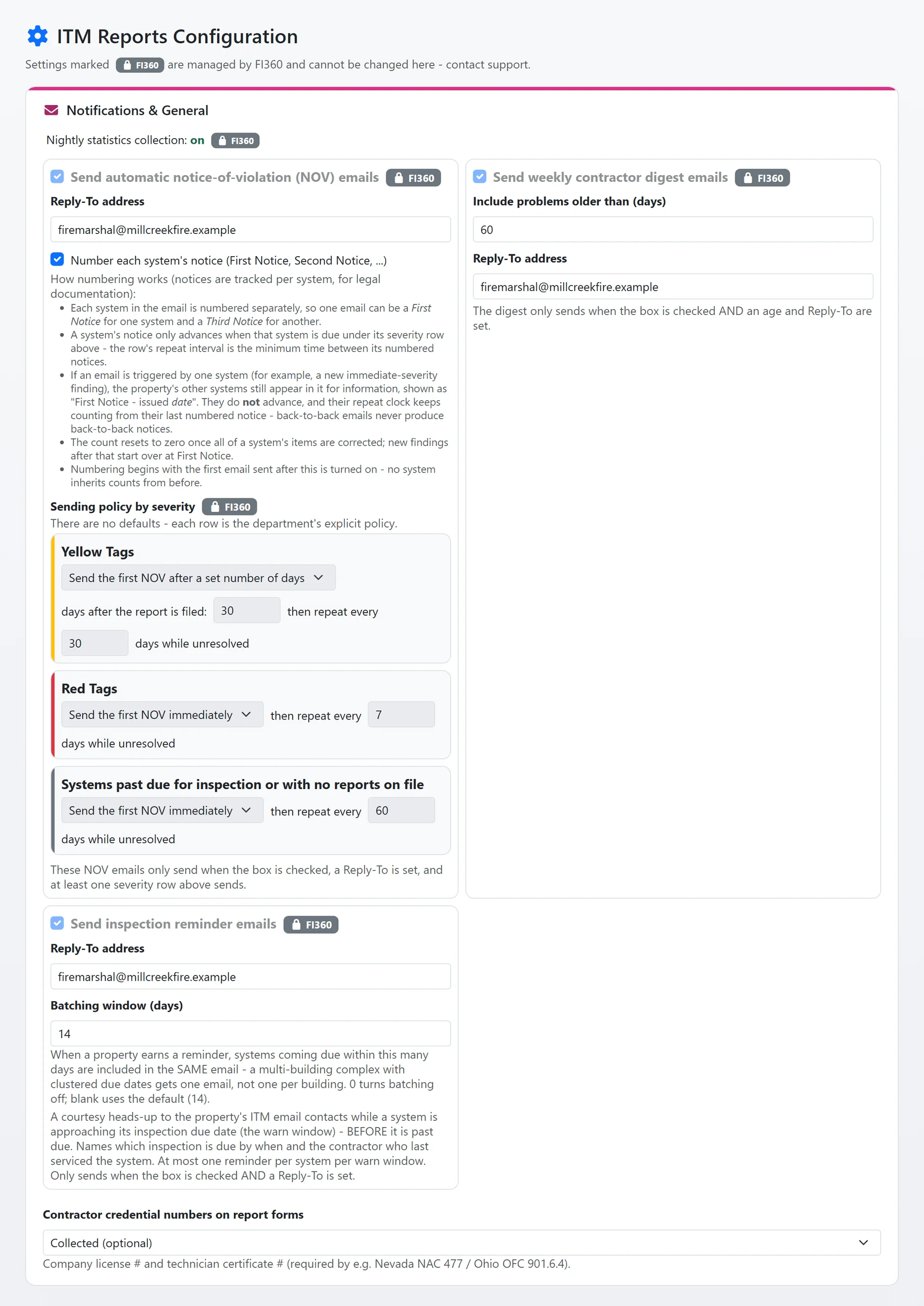
The department's notice settings, shown with sample data.
And that is only the start
The rest of what your department and its contractors get with the module.
Upload first, then check
With express intake switched on, a contractor uploads the report document first, FireInspection360 reads it and fills in the form, and the contractor checks every field before submitting. What was read is kept and shown beside the typed fields during verification.
Reminders before anything is late
A courtesy email to the property's notice contacts while a system's clock is in its warning window, naming the inspection due, the date, and the contractor who last serviced the system. One reminder per system per window, and systems coming due together ride in one email.
The contractor digest
A weekly email to each contractor listing the properties where they filed the last report and the system now carries a finding open longer than your threshold, or is past due with no later report from anyone.
Contacts and systems that add themselves
Accepting a report adds the system to the property if it was not recorded there, and adds the contractor's contact to the property record, so the next notice and the next reminder know who last serviced the system.
The contractor's own view
From the public portal a company sees the reports it filed, finishes one that was returned, looks up the ITM status of any property, and lists the non-compliant systems it last inspected or has ever inspected.
Analytics and a map
A nightly compliance snapshot feeds the ITM analytics over time, and every open finding is on a map with its tag as the pin.
See ITM reports with your own system types and tag scheme.
A one-hour walkthrough with a fire prevention expert, or the demo site right now.